Mavenir

Mobile App · B2B2C · Rebrand · Leadership

Mavenir, a telecommunications industry disruptor, offers a B2C mobile messaging app enabling small businesses to connect with customers and manage their digital presence. As Lead UI/UX Designer, I led a comprehensive mobile app redesign that transformed a fragmented, inconsistent interface into a cohesive, user-friendly experience—improving usability by +20% and directly contributing to a three-year client contract renewal.

Client

Mavenir

Services

App Design (iOS & Android) Product Strategy UX/UI Design Heuristic Analysis Design System Team Leadership

Industries

Telecommunications, B2C

Date

2022 → 2023
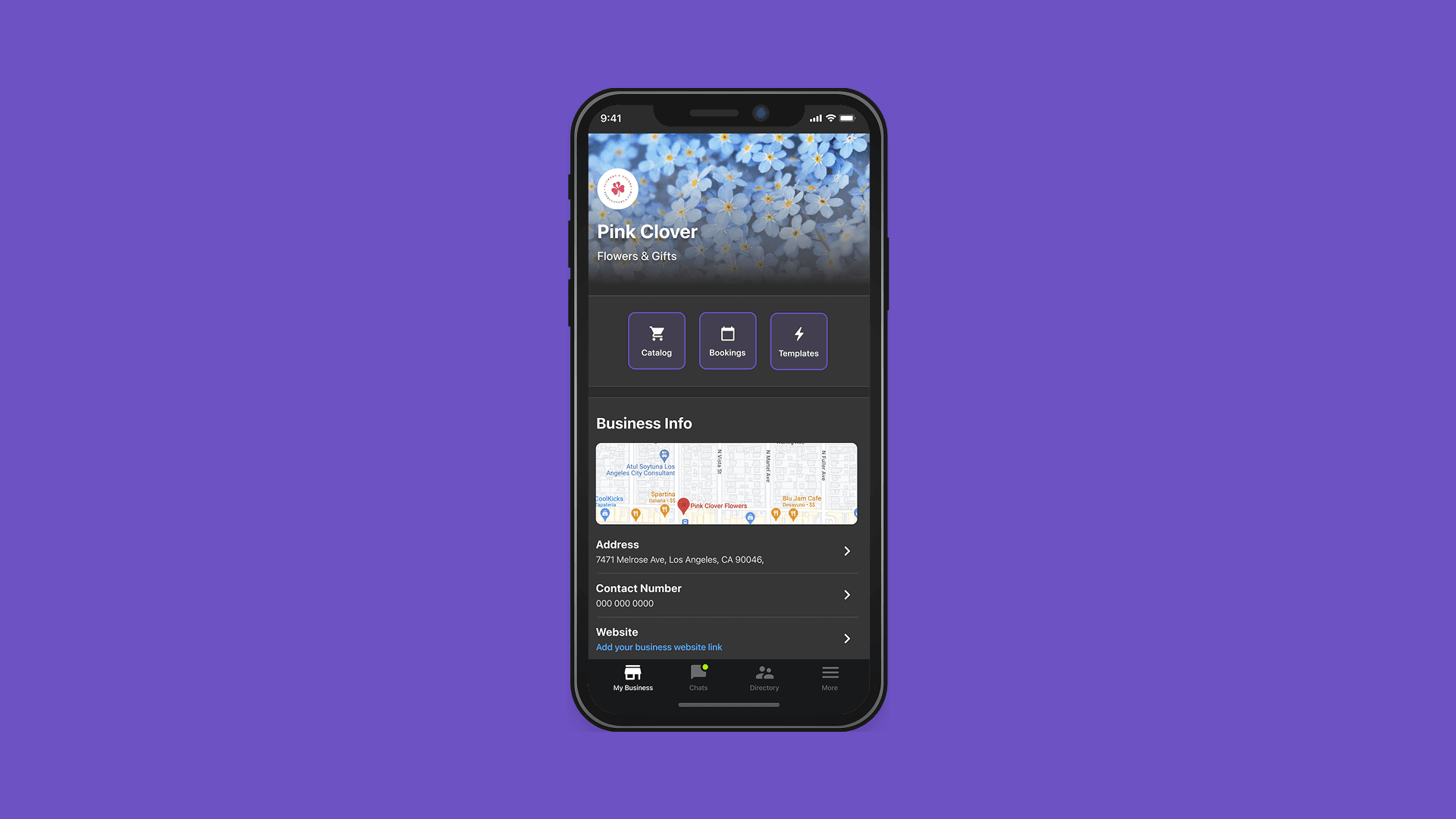
app screen

The ask

Transforming a confusing, inconsistent B2C messaging app into an intuitive platform that empowers small businesses to thrive digitally.

Leading with process: heuristic analysis, design sprint, and team restructure.

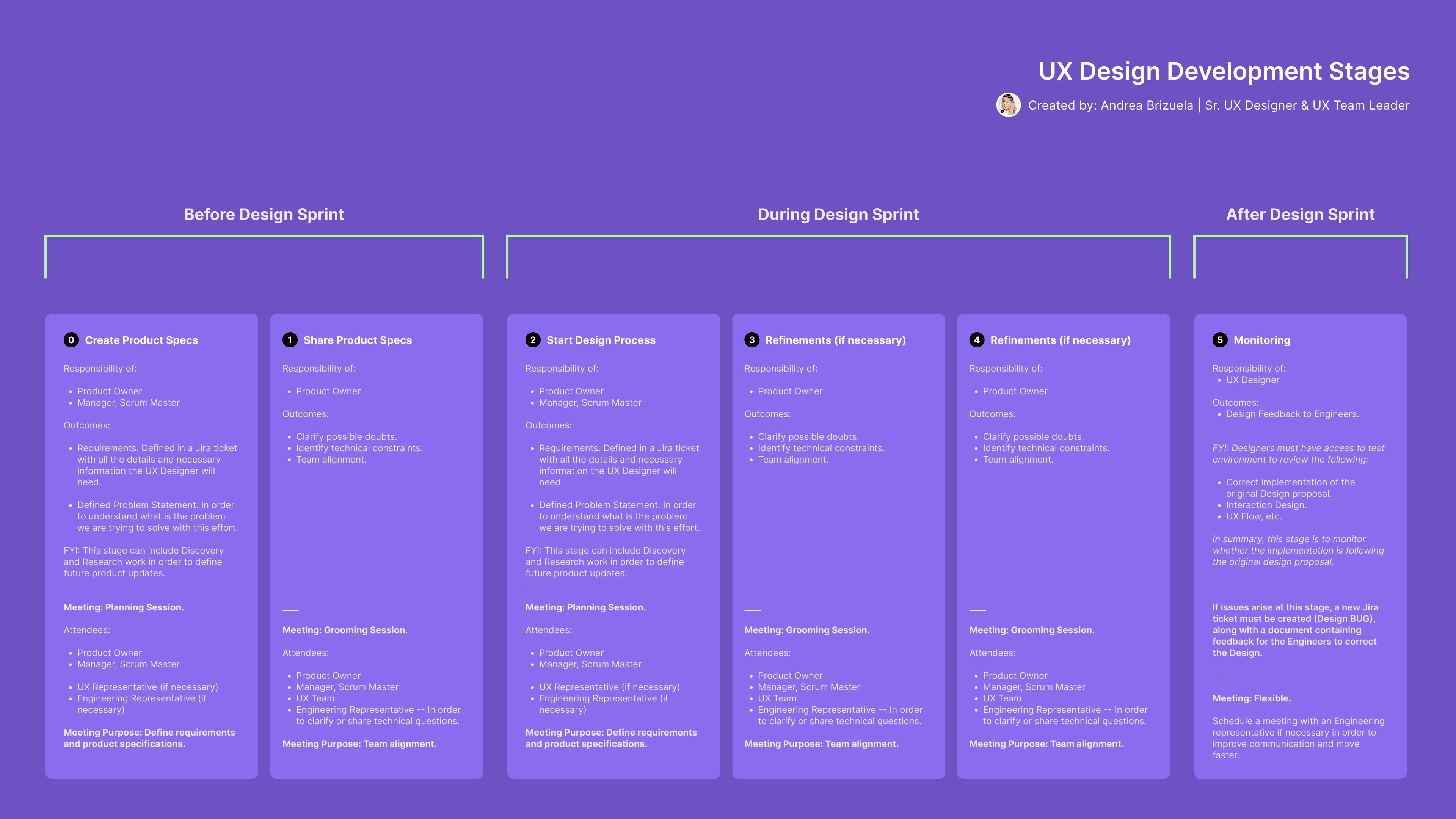
I assumed team leadership and established a structured, user-centered design process for the team. The first step was a comprehensive heuristic analysis across all key screens—Business Profile, Customer Chat, Product Catalog, and Collection Creation—documenting violations across clarity, consistency, proportion, and accessibility before proposing any solutions. With a clear problem map in place, I introduced agile methodology and led the team through a formal design sprint structured in three phases: pre-sprint task definition, active sprint with design iterations and refinements, and post-sprint monitoring. I also provided UX coaching to junior team members, improving both output quality and cross-functional collaboration with engineering. The redesign addressed every identified heuristic failure: navigation was restructured, visual hierarchy restored, color contrast brought to WCAG compliance, and component logic standardized across the product. Final designs were presented directly to the client's CEO and VP of Product.

The approach

Establishing design leadership and implementing user-centered processes to transform product quality and team collaboration.
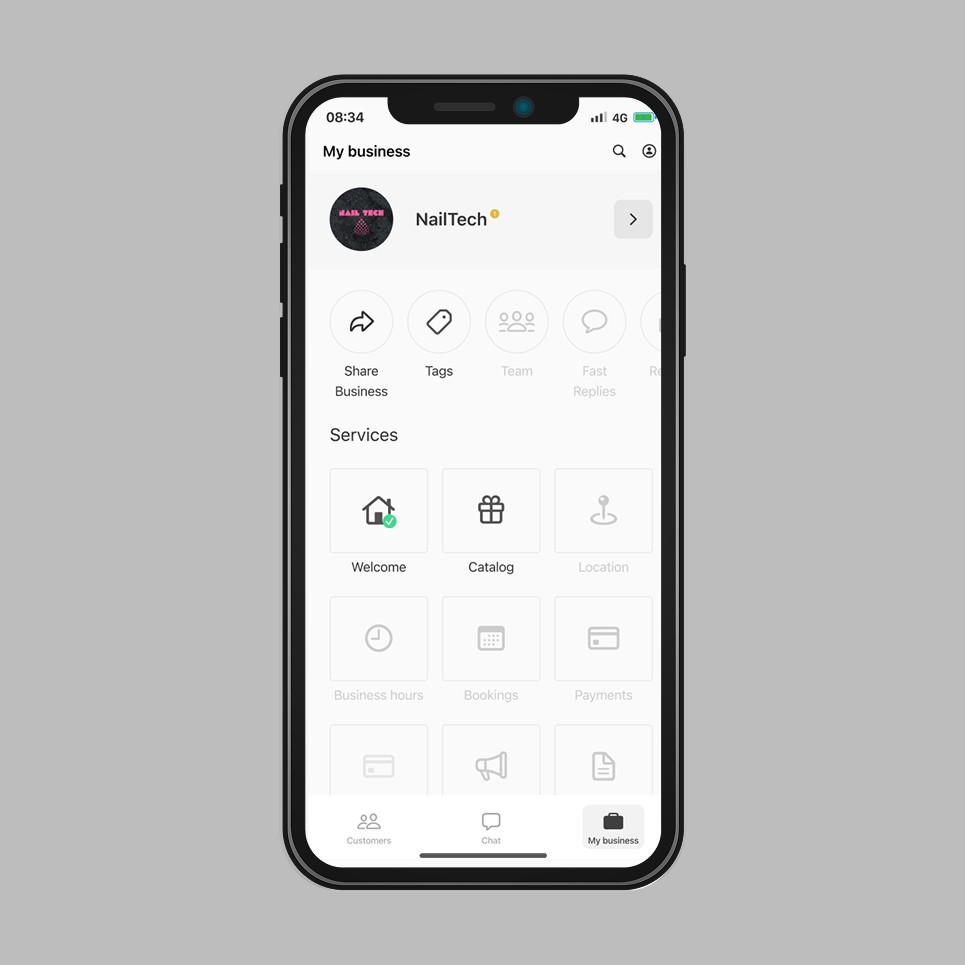
Dashboard Screen | Legacy

The screen presented multiple usability failures across navigation and information architecture. Tap targets for search and profile icons fell below minimum size standards. System feedback relied on an ambiguous yellow dot with no contextual information. Three inconsistent component shapes coexisted within a single screen, with incorrect white space application throughout. Feature labels — including "Welcome" and the gift icon — did not correspond to their underlying functions, undermining scannability and recognition. An underdeveloped Upcoming Services section introduced a divergent UI pattern, generating cognitive friction and user error.

Redesign

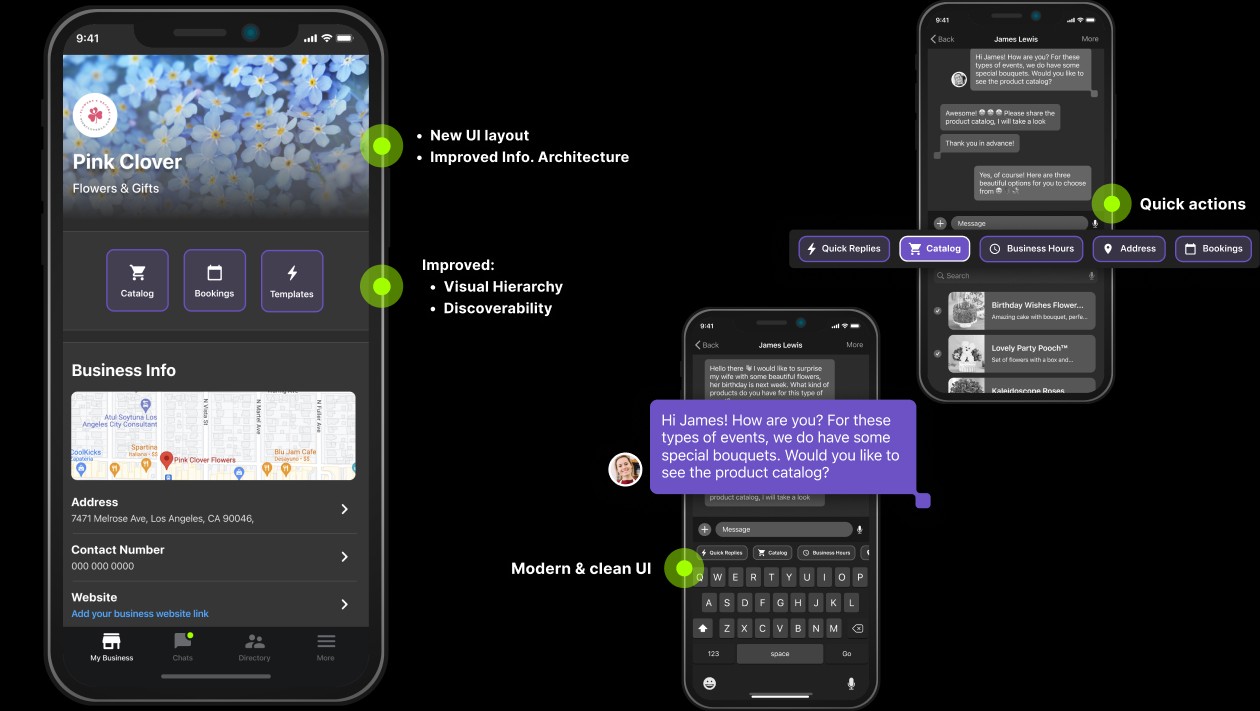
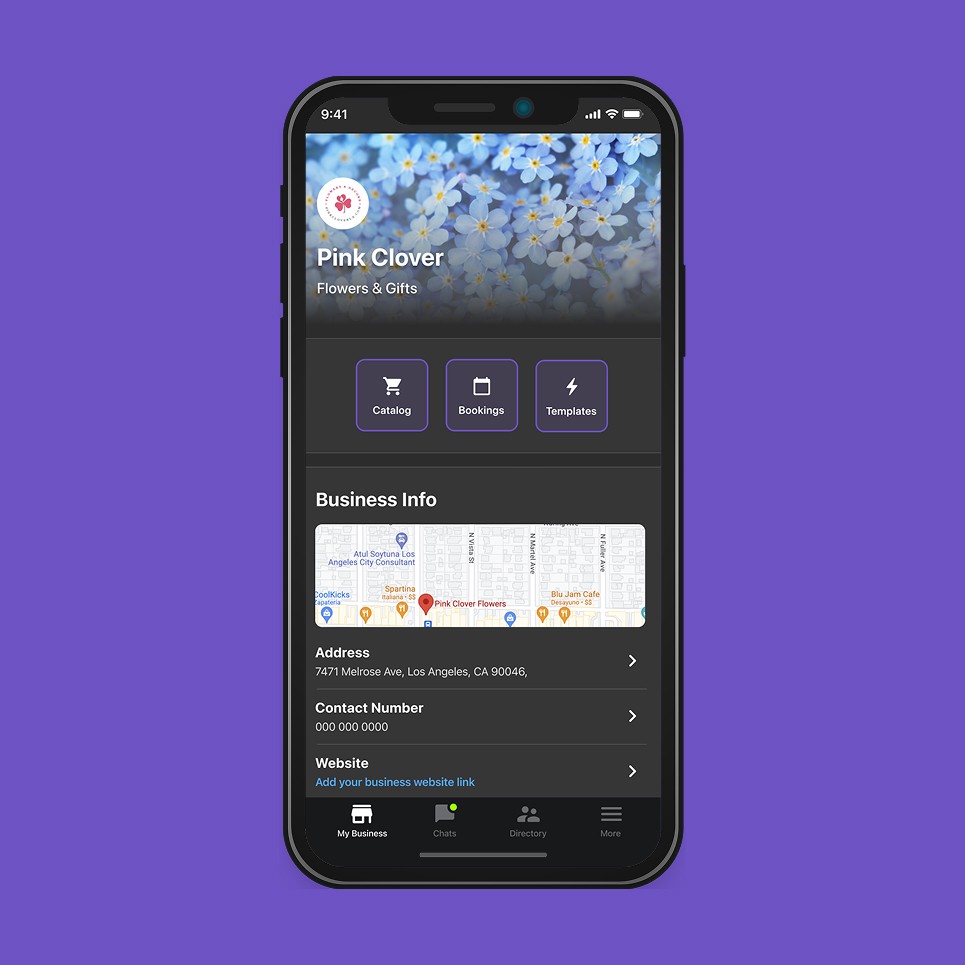
The screen was restructured around a dark-mode visual system with a consolidated, hierarchy-driven layout. Primary service categories — Catalog, Bookings, and Templates — were surfaced at the top level as labeled icon buttons, ordered by frequency of use. Business details were reorganized into a single unified section, integrating an embedded map, address, contact number, website, and operating hours under a clear typographic structure. Icons were updated to align with established user mental models. The bottom navigation bar was reordered and the color palette unified, resolving the inconsistencies present across the legacy interface.

Dashboard Screen | Legacy

The screen presented multiple usability failures across navigation and information architecture. Tap targets for search and profile icons fell below minimum size standards. System feedback relied on an ambiguous yellow dot with no contextual information. Three inconsistent component shapes coexisted within a single screen, with incorrect white space application throughout. Feature labels — including "Welcome" and the gift icon — did not correspond to their underlying functions, undermining scannability and recognition. An underdeveloped Upcoming Services section introduced a divergent UI pattern, generating cognitive friction and user error.

Redesign

The screen was restructured around a dark-mode visual system with a consolidated, hierarchy-driven layout. Primary service categories — Catalog, Bookings, and Templates — were surfaced at the top level as labeled icon buttons, ordered by frequency of use. Business details were reorganized into a single unified section, integrating an embedded map, address, contact number, website, and operating hours under a clear typographic structure. Icons were updated to align with established user mental models. The bottom navigation bar was reordered and the color palette unified, resolving the inconsistencies present across the legacy interface.

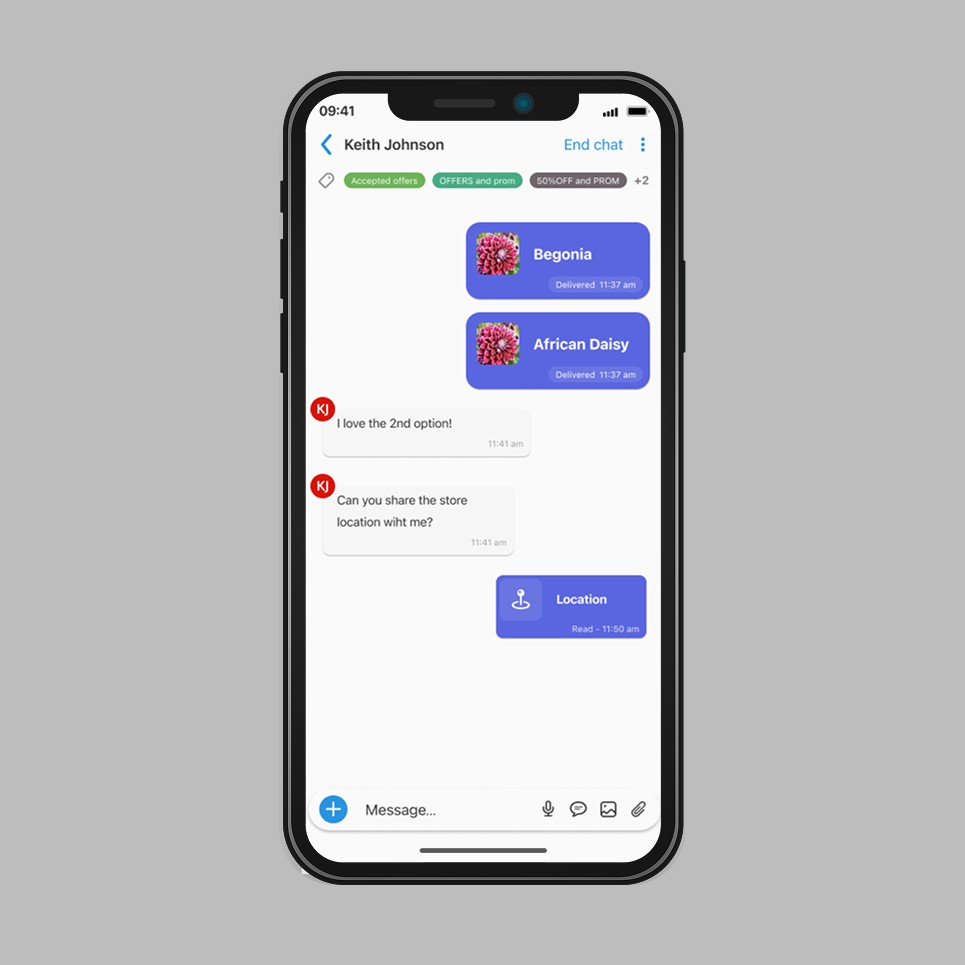
Customer–Business Chat | Legacy

The chat screen presented several clarity and consistency issues that degraded the messaging experience. The "End Chat" action lacked defined behavior — the outcome of ending a conversation and its recoverability were not communicated to the user. The Tags function offered no clear value proposition, and the associated color palette failed to meet contrast standards. The tag icon itself was unrecognizable, undermining familiarity. Customer avatars were displayed without profile images, adding visual noise without functional value. The message input field was incorrectly treated as a button, and shadow usage throughout the screen was inconsistent with the rest of the interface.

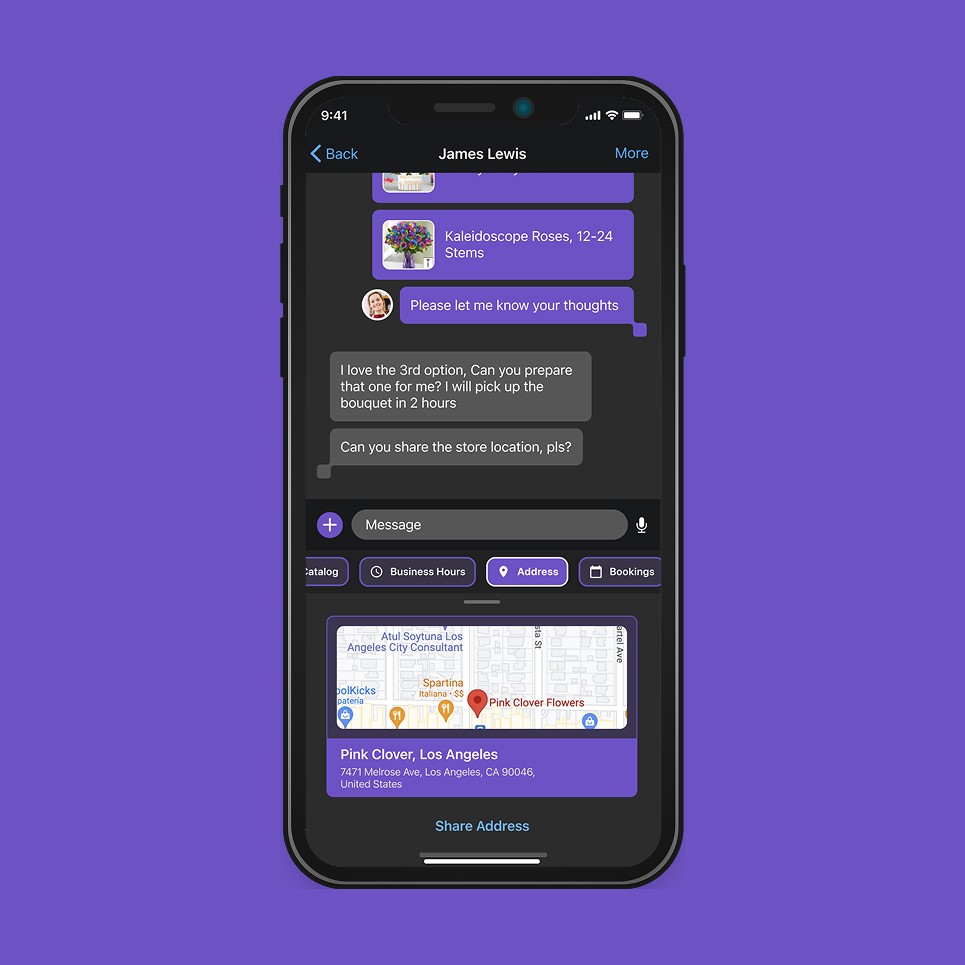
Redesign

The chat interface was redesigned under a unified dark-mode visual system aligned with the updated brand aesthetic. All secondary actions were consolidated under a "More" menu, reducing header clutter and improving action discoverability. The Tags feature was removed pending further product definition. Location sharing was redesigned as an embedded map card with a structured address display — clear, minimalist, and scannable. Chat bubbles were updated to reflect the new branding direction, with improved color contrast and typographic hierarchy. Quick reply shortcuts — including Catalog and Business Hours — were surfaced directly above the keyboard for faster response workflows.

Customer–Business Chat | Legacy

The chat screen presented several clarity and consistency issues that degraded the messaging experience. The "End Chat" action lacked defined behavior — the outcome of ending a conversation and its recoverability were not communicated to the user. The Tags function offered no clear value proposition, and the associated color palette failed to meet contrast standards. The tag icon itself was unrecognizable, undermining familiarity. Customer avatars were displayed without profile images, adding visual noise without functional value. The message input field was incorrectly treated as a button, and shadow usage throughout the screen was inconsistent with the rest of the interface.

Redesign

The chat interface was redesigned under a unified dark-mode visual system aligned with the updated brand aesthetic. All secondary actions were consolidated under a "More" menu, reducing header clutter and improving action discoverability. The Tags feature was removed pending further product definition. Location sharing was redesigned as an embedded map card with a structured address display — clear, minimalist, and scannable. Chat bubbles were updated to reflect the new branding direction, with improved color contrast and typographic hierarchy. Quick reply shortcuts — including Catalog and Business Hours — were surfaced directly above the keyboard for faster response workflows.

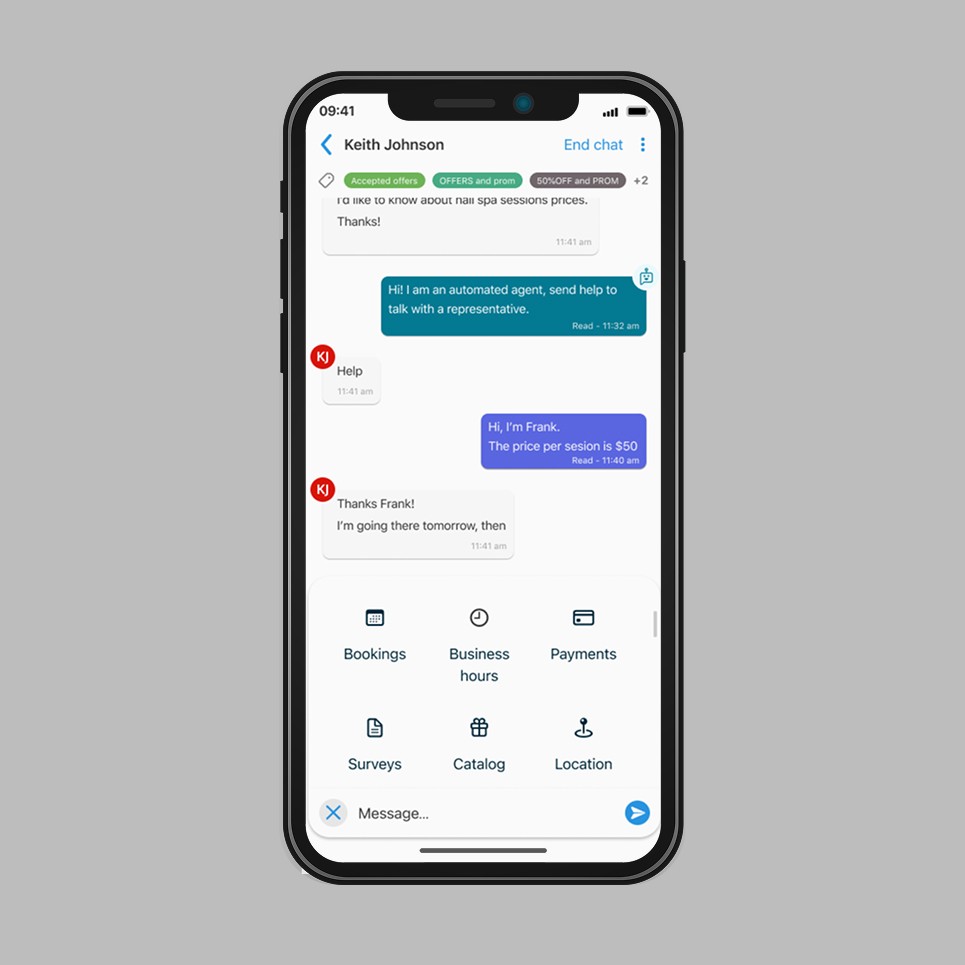
Customer–Business Chat, Quick Actions | Legacy

The expanded quick actions panel occupied a disproportionate amount of screen space, pushing the conversation out of view and disrupting the messaging flow. The interaction model for accessing and dismissing the panel lacked efficiency, increasing the number of steps required to send a response. The close icon and message input field were positioned with insufficient spacing between them, violating Gestalt proximity principles and creating a high risk of user error. Icon choices across the panel did not align with established mental models, reducing recognizability.

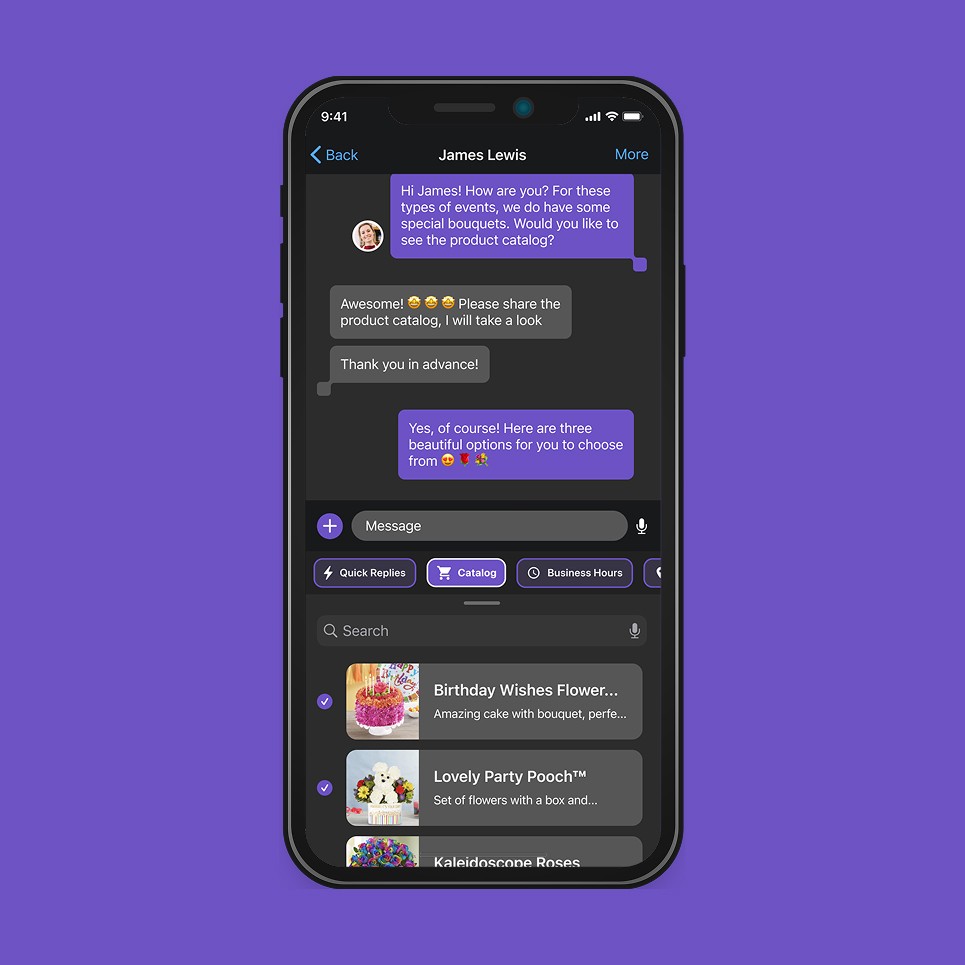
Redesign

Quick action shortcuts — Quick Replies, Catalog, Business Hours, etc. — were redesigned as compact, labeled pill buttons surfaced directly above the keyboard, eliminating the need for an expanded panel. This treatment reduces response time and keeps the conversation thread fully visible during interaction. Icons were updated to match user mental models, improving recognition without reliance on labels alone. The input field and surrounding controls were redesigned with adequate spacing and a minimalist button aesthetic, resolving the proximity conflict present in the legacy layout.

Customer–Business Chat, Quick Actions | Legacy

The expanded quick actions panel occupied a disproportionate amount of screen space, pushing the conversation out of view and disrupting the messaging flow. The interaction model for accessing and dismissing the panel lacked efficiency, increasing the number of steps required to send a response. The close icon and message input field were positioned with insufficient spacing between them, violating Gestalt proximity principles and creating a high risk of user error. Icon choices across the panel did not align with established mental models, reducing recognizability.

Redesign

Quick action shortcuts — Quick Replies, Catalog, Business Hours, etc. — were redesigned as compact, labeled pill buttons surfaced directly above the keyboard, eliminating the need for an expanded panel. This treatment reduces response time and keeps the conversation thread fully visible during interaction. Icons were updated to match user mental models, improving recognition without reliance on labels alone. The input field and surrounding controls were redesigned with adequate spacing and a minimalist button aesthetic, resolving the proximity conflict present in the legacy layout.

Product Catalog | Legacy

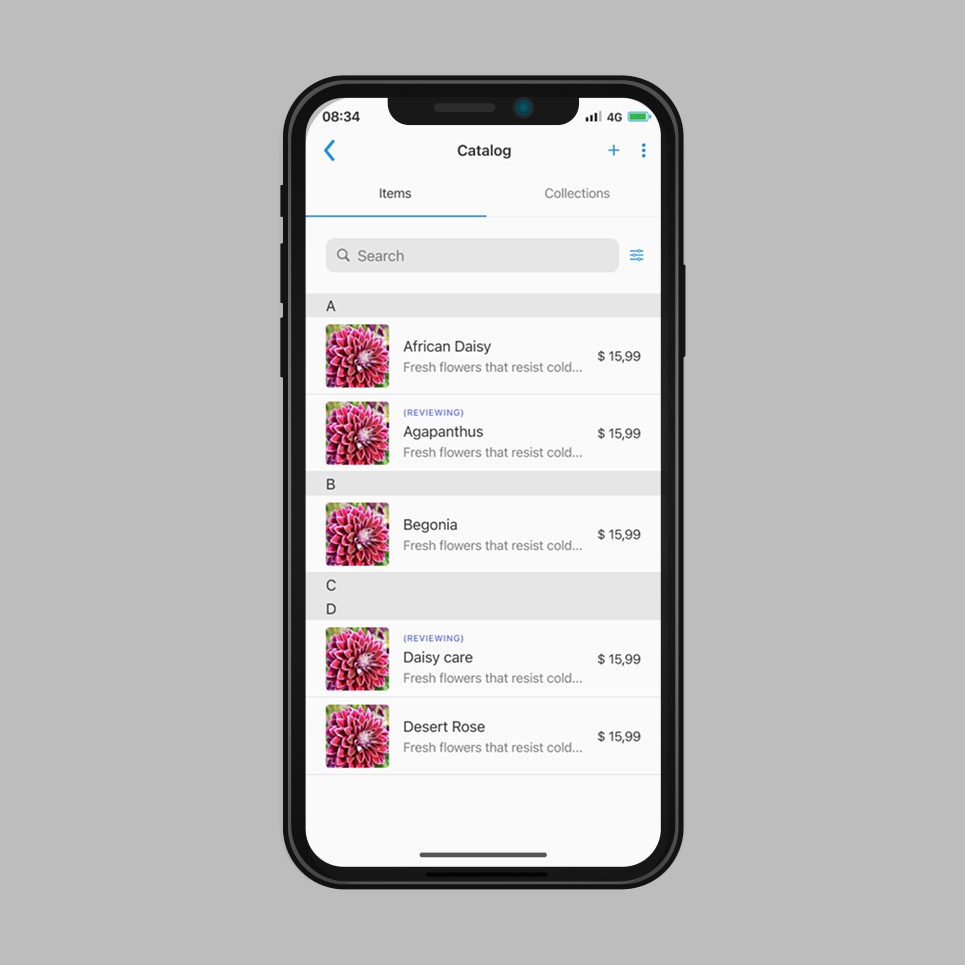
The Catalog screen presented multiple clarity and consistency issues that compromised usability. The three-dot icon in the header offered no clear function, leaving users uncertain about the actions available. The purpose of the plus icon was equally ambiguous — it was unclear whether it added a new catalog, collection, or individual item. The search component's color palette was inconsistent with the rest of the interface, and the filter icon provided no visible indication of whether a filter was actively applied. Alphabetical grouping headers and inline status labels such as "Reviewing" introduced visual noise without meaningful value for the end user.

Redesign

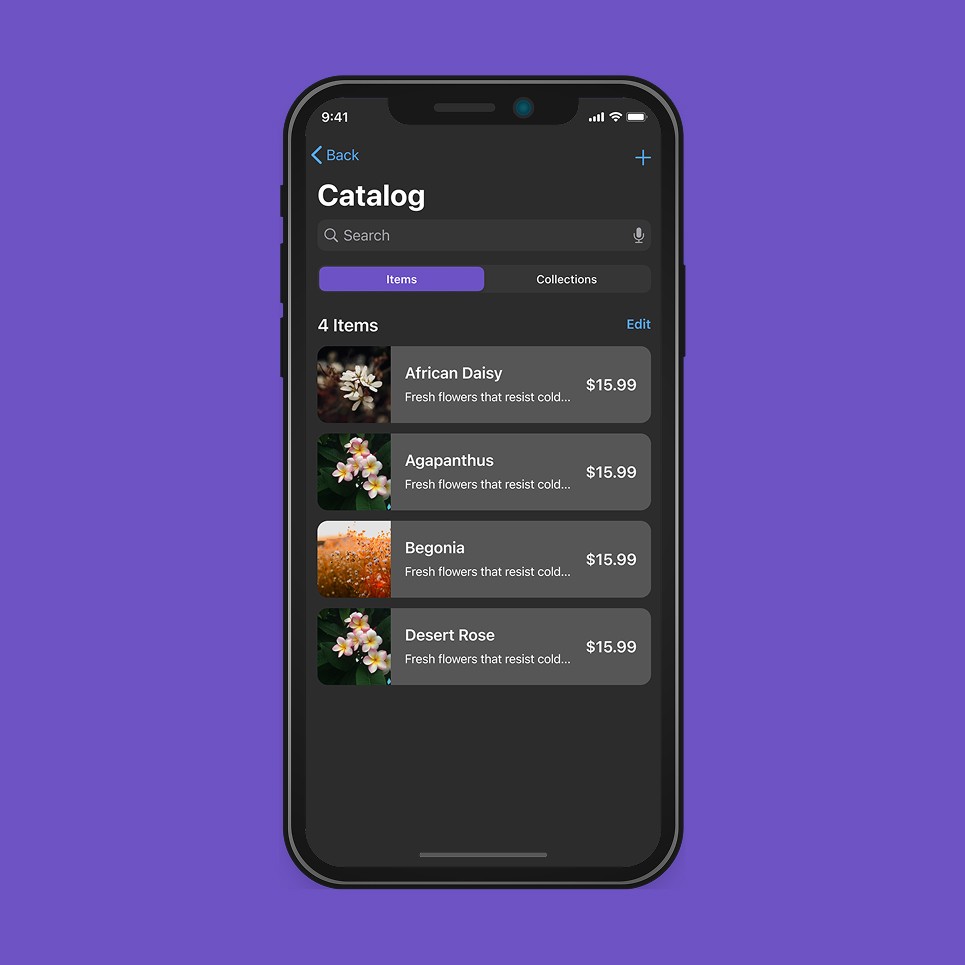
The header was simplified by removing the three-dot icon, retaining only the plus action for adding new items. A microphone icon was introduced in the search field to support voice input, improving accessibility. The active tab indicator was updated to the unified purple color system, and the list component background was revised to match the new dark-mode palette. A dynamic item count label was added below the tab bar, giving users immediate context on catalog size. List rows were redesigned with larger product imagery, improved typographic hierarchy, and consistent price alignment — increasing scannability and reducing cognitive load across the catalog view.

Product Catalog | Legacy

The Catalog screen presented multiple clarity and consistency issues that compromised usability. The three-dot icon in the header offered no clear function, leaving users uncertain about the actions available. The purpose of the plus icon was equally ambiguous — it was unclear whether it added a new catalog, collection, or individual item. The search component's color palette was inconsistent with the rest of the interface, and the filter icon provided no visible indication of whether a filter was actively applied. Alphabetical grouping headers and inline status labels such as "Reviewing" introduced visual noise without meaningful value for the end user.

Redesign

The header was simplified by removing the three-dot icon, retaining only the plus action for adding new items. A microphone icon was introduced in the search field to support voice input, improving accessibility. The active tab indicator was updated to the unified purple color system, and the list component background was revised to match the new dark-mode palette. A dynamic item count label was added below the tab bar, giving users immediate context on catalog size. List rows were redesigned with larger product imagery, improved typographic hierarchy, and consistent price alignment — increasing scannability and reducing cognitive load across the catalog view.

Collection Creation | Legacy

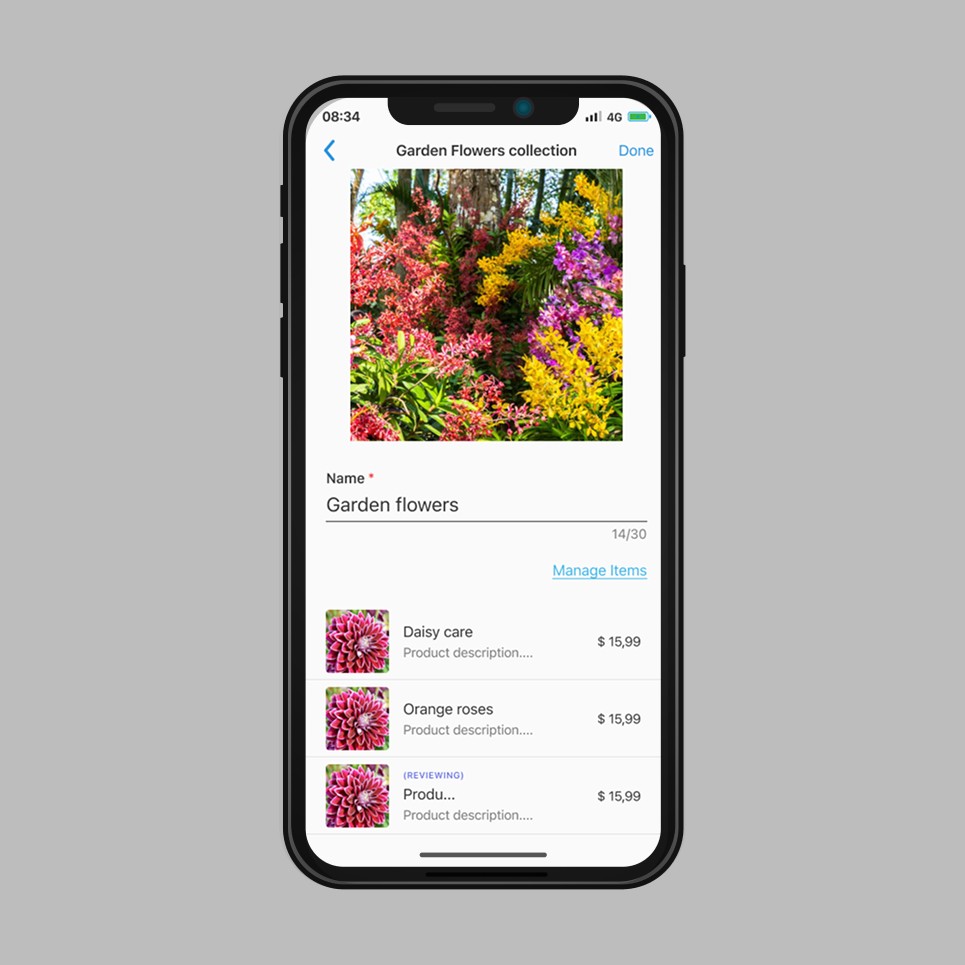
The collection creation screen presented proportion, spacing, and hierarchy issues that degraded the overall form usability. The hero image occupied a disproportionate amount of vertical space, leaving insufficient room for data input fields below. Excessive distance between elements violated proximity principles, weakening the visual relationship between related components. The "Manage Items" action was presented as a low-contrast text link, failing to communicate its role as the screen's primary action. Color contrast throughout the screen did not meet accessibility standards.

Redesign

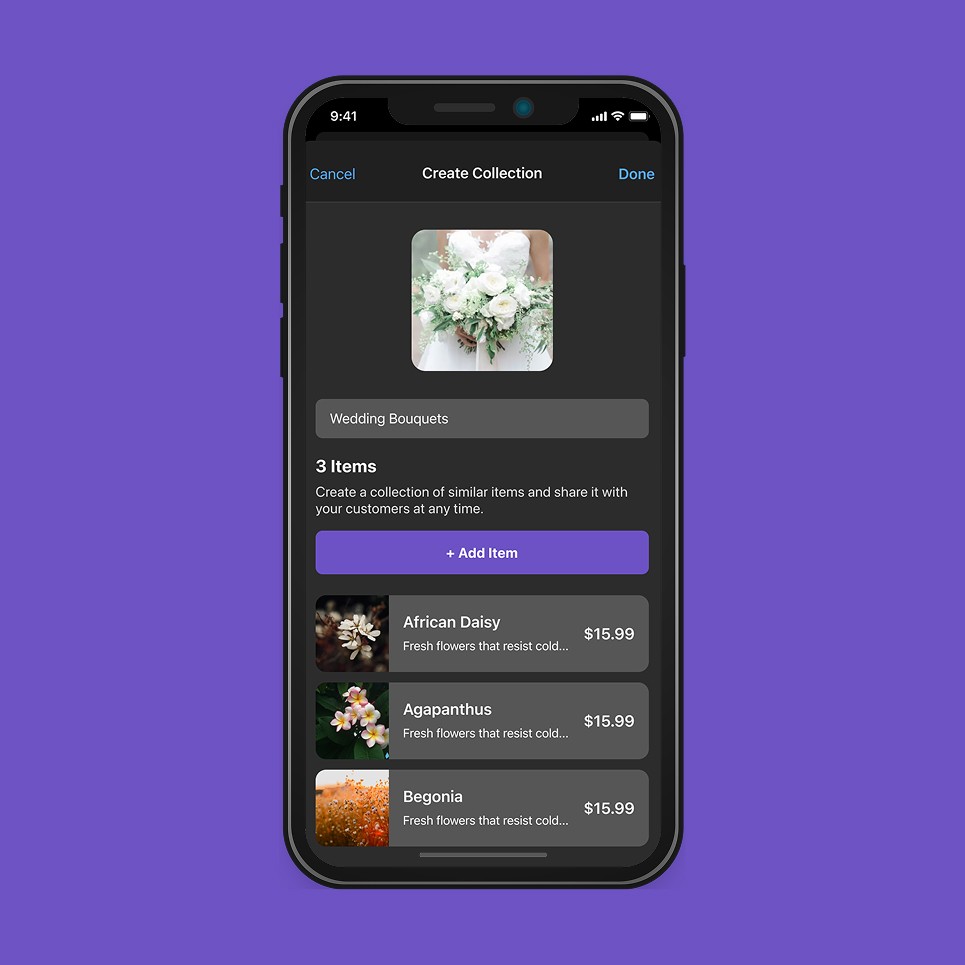
The screen was restructured under the unified dark-mode system with a significantly reduced image container, improving compositional balance and providing adequate space for form inputs below. The collection name field was redesigned as a visually integrated text input, replacing the underline-only treatment for improved clarity. The primary action was relabeled from "Manage Items" to "+ Add Item" and rendered as a full-width filled button in the brand purple, establishing clear visual hierarchy. An item count and contextual description were added above the action to orient users within the creation flow. The item list was redesigned with larger imagery, consistent row structure, and improved contrast — aligned with the catalog component system established across the redesign.

Collection Creation | Legacy

The collection creation screen presented proportion, spacing, and hierarchy issues that degraded the overall form usability. The hero image occupied a disproportionate amount of vertical space, leaving insufficient room for data input fields below. Excessive distance between elements violated proximity principles, weakening the visual relationship between related components. The "Manage Items" action was presented as a low-contrast text link, failing to communicate its role as the screen's primary action. Color contrast throughout the screen did not meet accessibility standards.

Redesign

The screen was restructured under the unified dark-mode system with a significantly reduced image container, improving compositional balance and providing adequate space for form inputs below. The collection name field was redesigned as a visually integrated text input, replacing the underline-only treatment for improved clarity. The primary action was relabeled from "Manage Items" to "+ Add Item" and rendered as a full-width filled button in the brand purple, establishing clear visual hierarchy. An item count and contextual description were added above the action to orient users within the creation flow. The item list was redesigned with larger imagery, consistent row structure, and improved contrast — aligned with the catalog component system established across the redesign.

The impact

The redesigned product was demoed to the client's CEO and VP of Product, securing the business relationship and validating the new design direction. The design process established during this engagement—sprint structure, agile workflow, and handoff standards—was formally adopted by the team as the operational baseline going forward.

Building consistency and clarity

Mavenir required more than a visual update—it required rebuilding how the team worked. By introducing structure where there was ambiguity, and a shared design language where there was inconsistency, the project delivered two outcomes in parallel: a more usable product for end users, and a more functional team for the client. The heuristic-first approach ensured every design decision was traceable to a real user problem, not aesthetic preference.