Slack + Salesforce Philanthropy Cloud

Slack App · B2B2C · Enterprise · Cross-Platform

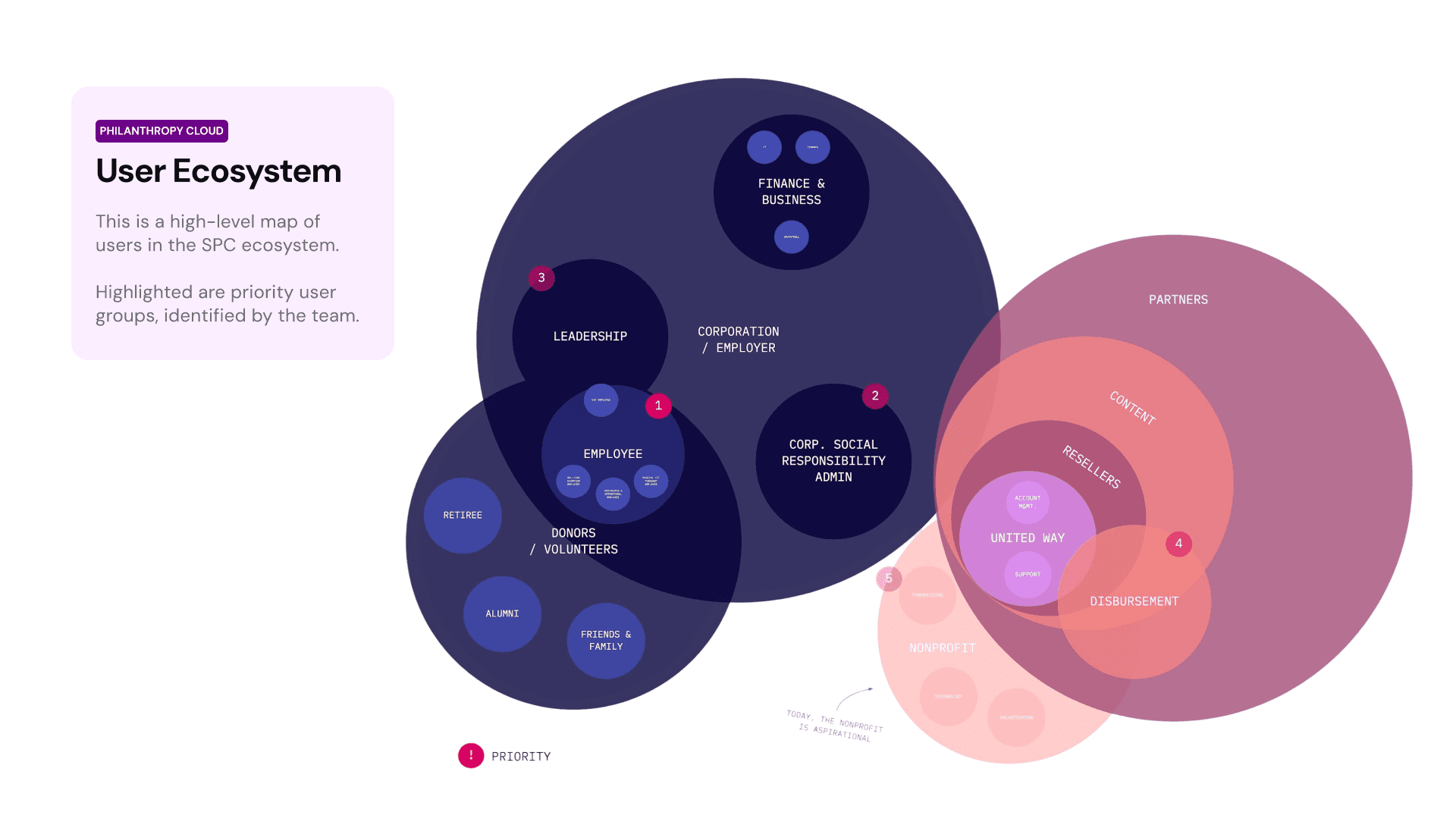
Salesforce acquired Slack in 2021, and every product team across the organization faced the same challenge: build a Slack version of their product—on deadline, within Slack's technical constraints, and aligned with its design language. As the lead designer for Philanthropy Cloud, I designed the SPC Slack app from the ground up: a condensed yet fully functional experience that brought philanthropy into the flow of work.

Client

Salesforce

Services

Product Strategy Slack App Design Cross-platform Integration Prototyping Accessibility

Industries

SaaS, Nonprofit Tech Enterprise

Date

January – September 2021 (Showcased at Dreamforce)
app screen
app screen

The ask

Bringing corporate giving into Slack: Designing a seamless integration that makes philanthropy as easy as sending a message.

Understanding the platform

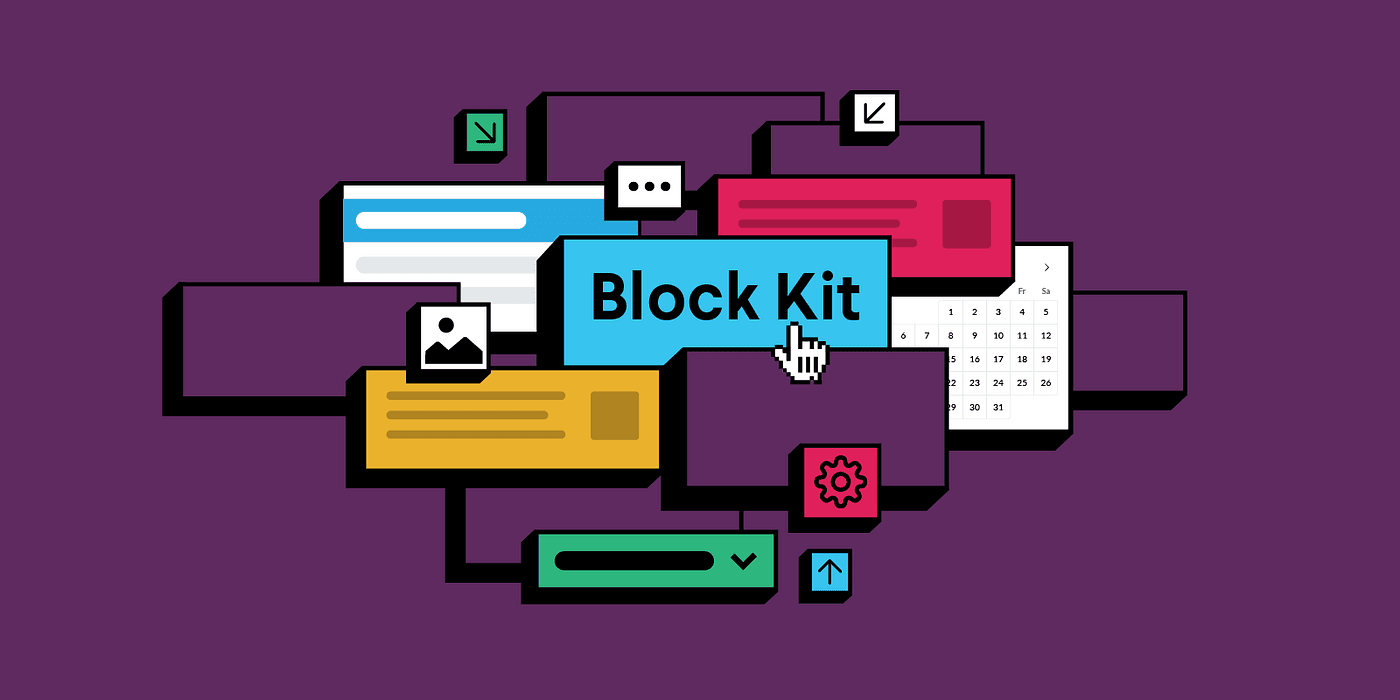
Before any wireframe, I embedded myself with the engineering team. Study sessions with engineers gave me a clear picture of what Slack's Block Kit could—and could not—do. That understanding shaped every design decision. I partnered with the Salesforce.org research team to identify which features were essential for our Donor and Volunteer users, grounding the scope in real behavioral data rather than assumptions. Working closely with PM and UX Directors, I presented proposals bi-weekly in feedback sessions that spanned engineering constraints, accessibility requirements, and Slack's visual language. The result was two iterative prototypes—January 2021 and June 2021—followed by a final prototype in September, each refined based on user research findings, accessibility audits, and direct engineer feedback.
The approach

Designing within constraints: mastering Slack's component system to ship a complete experience in record time.
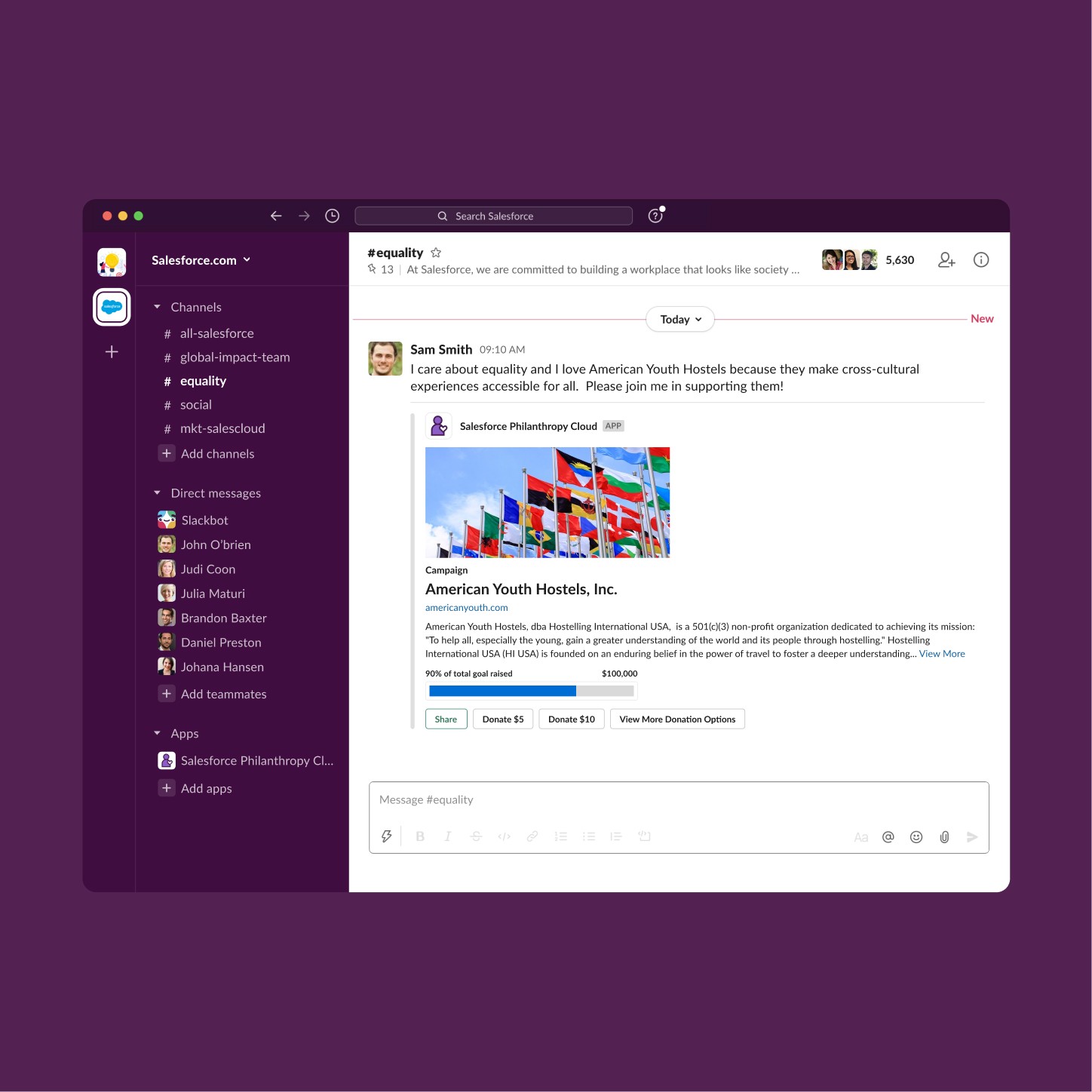
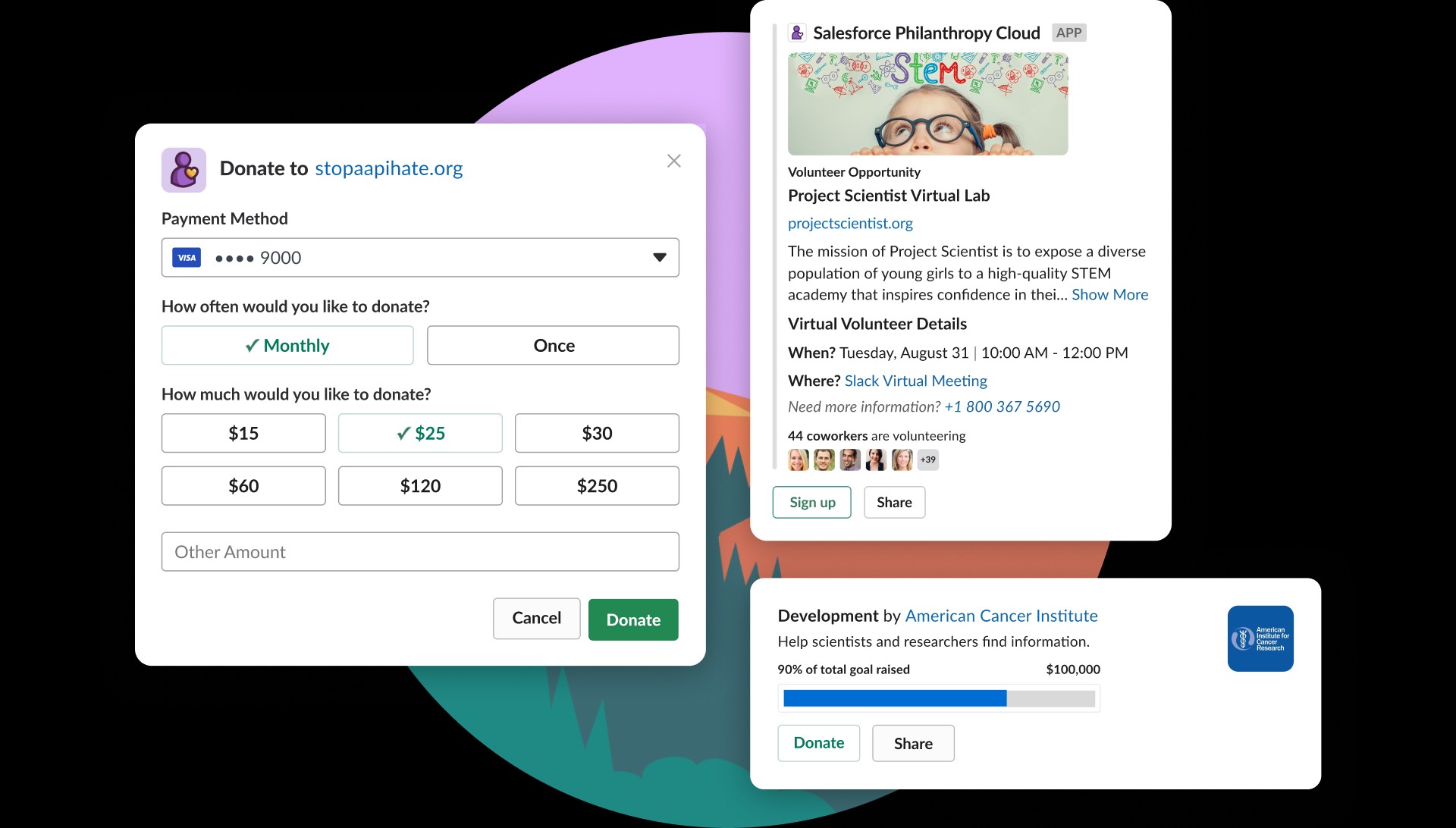
Donation Card | Slack Desktop

The campaign card consolidates nonprofit context, goal progress, and primary donation actions into a single Block Kit message attachment—eliminating the need to leave Slack to complete a transaction. Suggested donation amounts are surfaced as quick-action buttons, reducing decision friction at the point of giving. A progress indicator communicates campaign momentum, leveraging social proof to drive contribution. The Share action allows donors to propagate the card to any channel or DM, turning a personal giving moment into a peer engagement trigger.

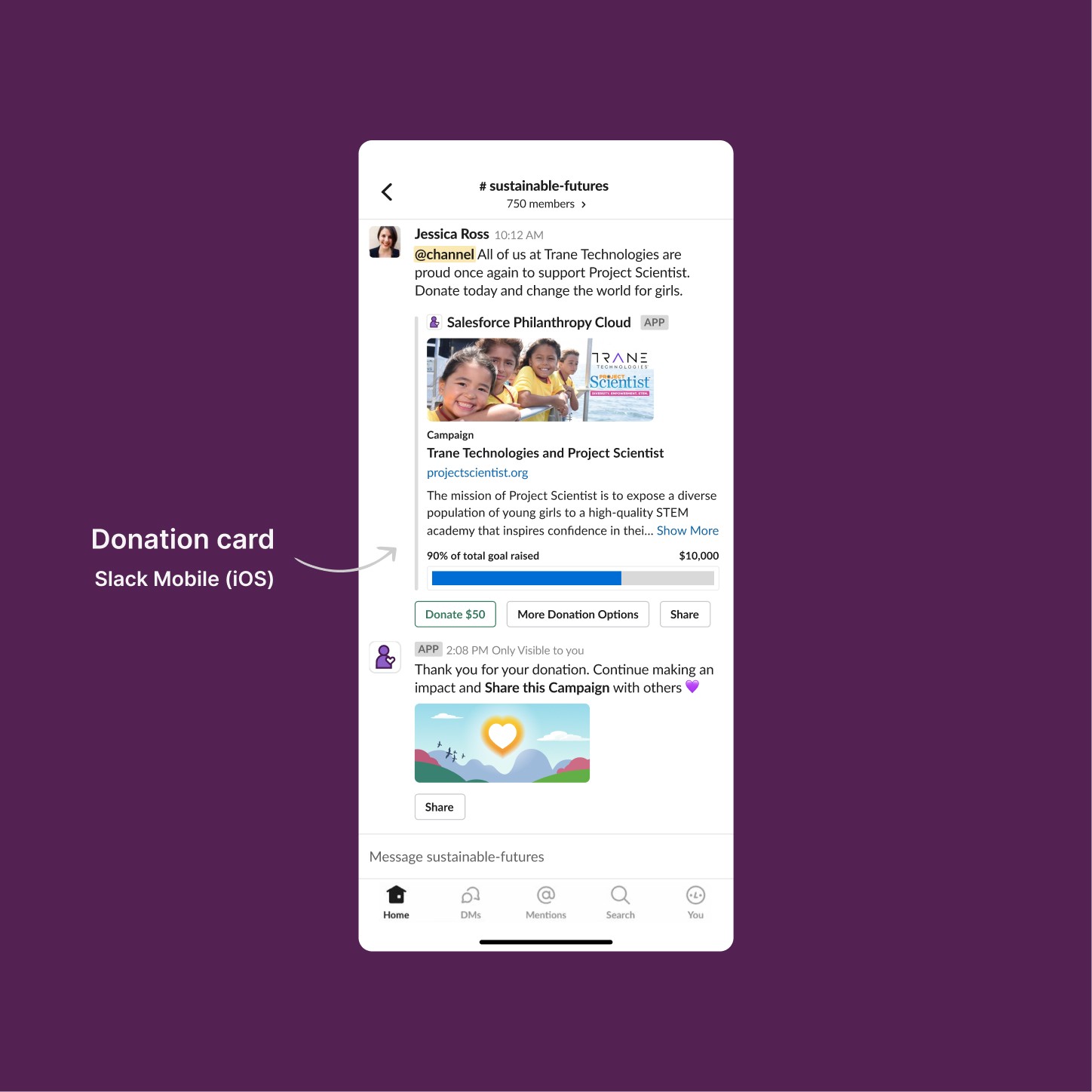
Donation Card | Slack Mobile (iOS)

The same card component adapts to Slack's native iOS layout, maintaining action parity with the web version. Post-donation, the app delivers a private confirmation message with an embedded Share CTA—creating a two-step engagement loop: complete the transaction, then amplify impact socially.

Donation Card | Slack Desktop

The campaign card consolidates nonprofit context, goal progress, and primary donation actions into a single Block Kit message attachment—eliminating the need to leave Slack to complete a transaction. Suggested donation amounts are surfaced as quick-action buttons, reducing decision friction at the point of giving. A progress indicator communicates campaign momentum, leveraging social proof to drive contribution. The Share action allows donors to propagate the card to any channel or DM, turning a personal giving moment into a peer engagement trigger.

Donation Card | Slack Mobile (iOS)

The same card component adapts to Slack's native iOS layout, maintaining action parity with the web version. Post-donation, the app delivers a private confirmation message with an embedded Share CTA—creating a two-step engagement loop: complete the transaction, then amplify impact socially.

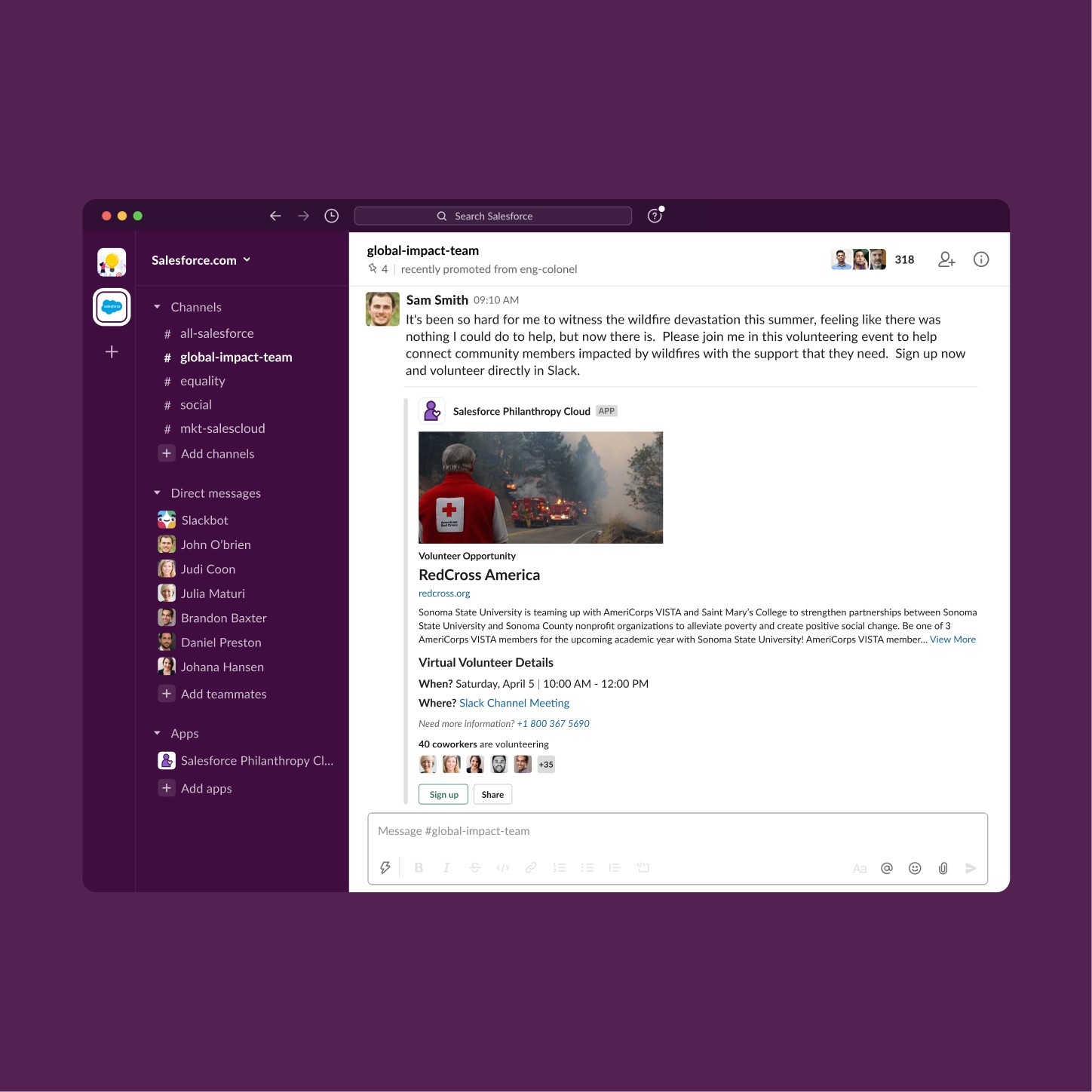
Volunteer Opportunity Card | Slack Desktop

The volunteer card mirrors the donation card's structural logic while introducing opportunity-specific metadata: date, time, location type, and a direct contact reference—giving users the full decision-making context without leaving the channel. A coworker participation indicator surfaces social proof at the component level, exploiting peer influence to increase sign-up conversion. For virtual opportunities, the Where field links directly to a Slack Channel Meeting, keeping the entire volunteering experience—discovery, sign-up, and participation—within the same platform.

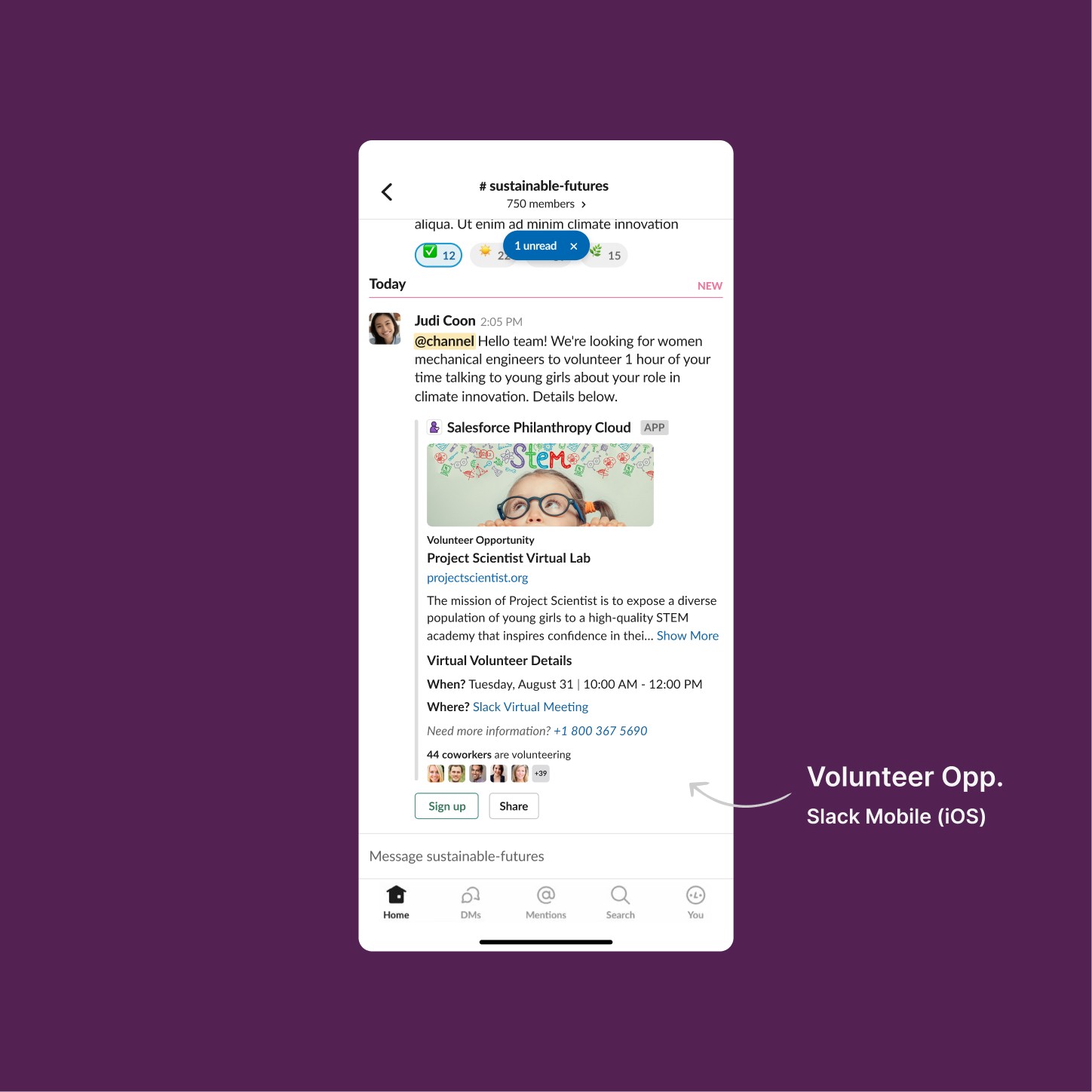
Volunteer Opportunity Card | Slack Mobile (iOS)

The mobile rendition maintains full information parity with the web version, adapting layout density to Slack's iOS Block Kit constraints. Virtual volunteer details resolve to a Slack-native meeting link, eliminating platform-switching friction for the user.

Volunteer Opportunity Card | Slack Desktop

The volunteer card mirrors the donation card's structural logic while introducing opportunity-specific metadata: date, time, location type, and a direct contact reference—giving users the full decision-making context without leaving the channel. A coworker participation indicator surfaces social proof at the component level, exploiting peer influence to increase sign-up conversion. For virtual opportunities, the Where field links directly to a Slack Channel Meeting, keeping the entire volunteering experience—discovery, sign-up, and participation—within the same platform.

Volunteer Opportunity Card | Slack Mobile (iOS)

The mobile rendition maintains full information parity with the web version, adapting layout density to Slack's iOS Block Kit constraints. Virtual volunteer details resolve to a Slack-native meeting link, eliminating platform-switching friction for the user.

Donate Flow + Share Campaign
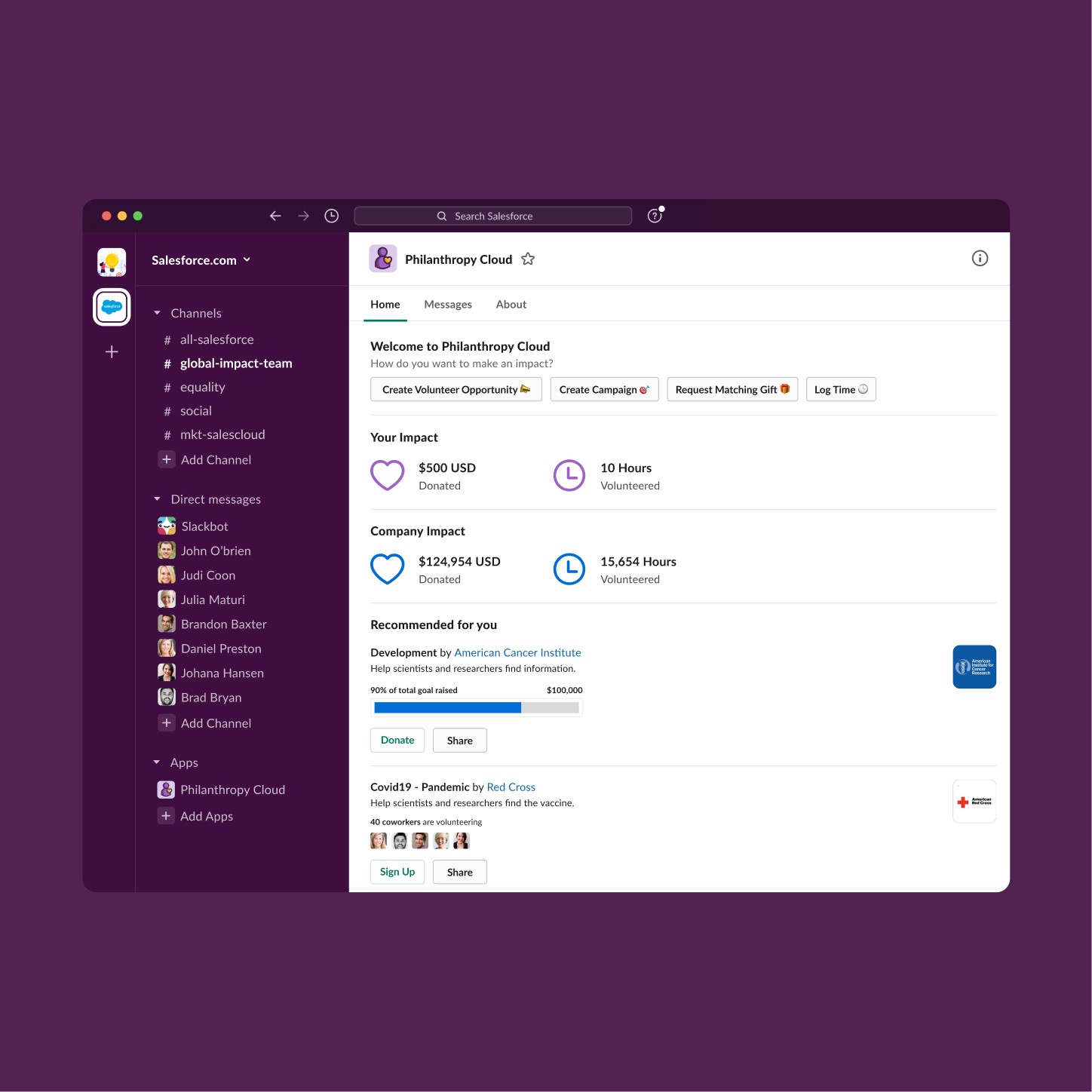
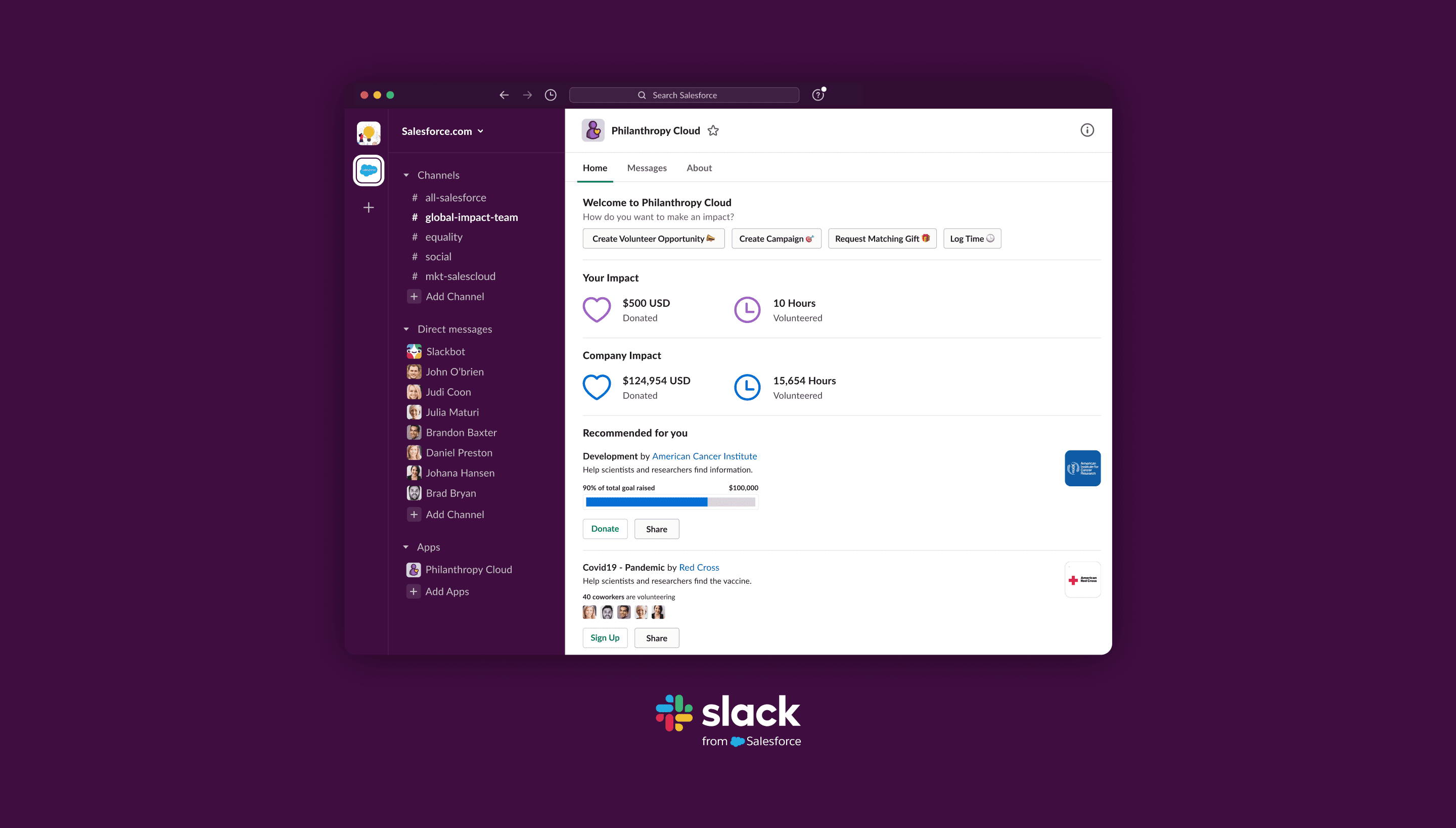
App Home Tab | Impact Dashboard & Quick Actions

The Home Tab functions as the app's primary navigation surface within Slack, consolidating all entry points into a single persistent view. Admin quick actions—Create Volunteer Opportunity, Create Campaign, Request Matching Gift, Log Time—are exposed as a top-level button row, reducing the task path to a single tap. Below, individual and company impact metrics are displayed in a two-tier structure, reinforcing both personal accountability and collective progress. Recommended campaigns and volunteer opportunities are surfaced inline with direct Donate and Sign Up actions, collapsing the discovery-to-action funnel without requiring navigation outside the Home Tab.

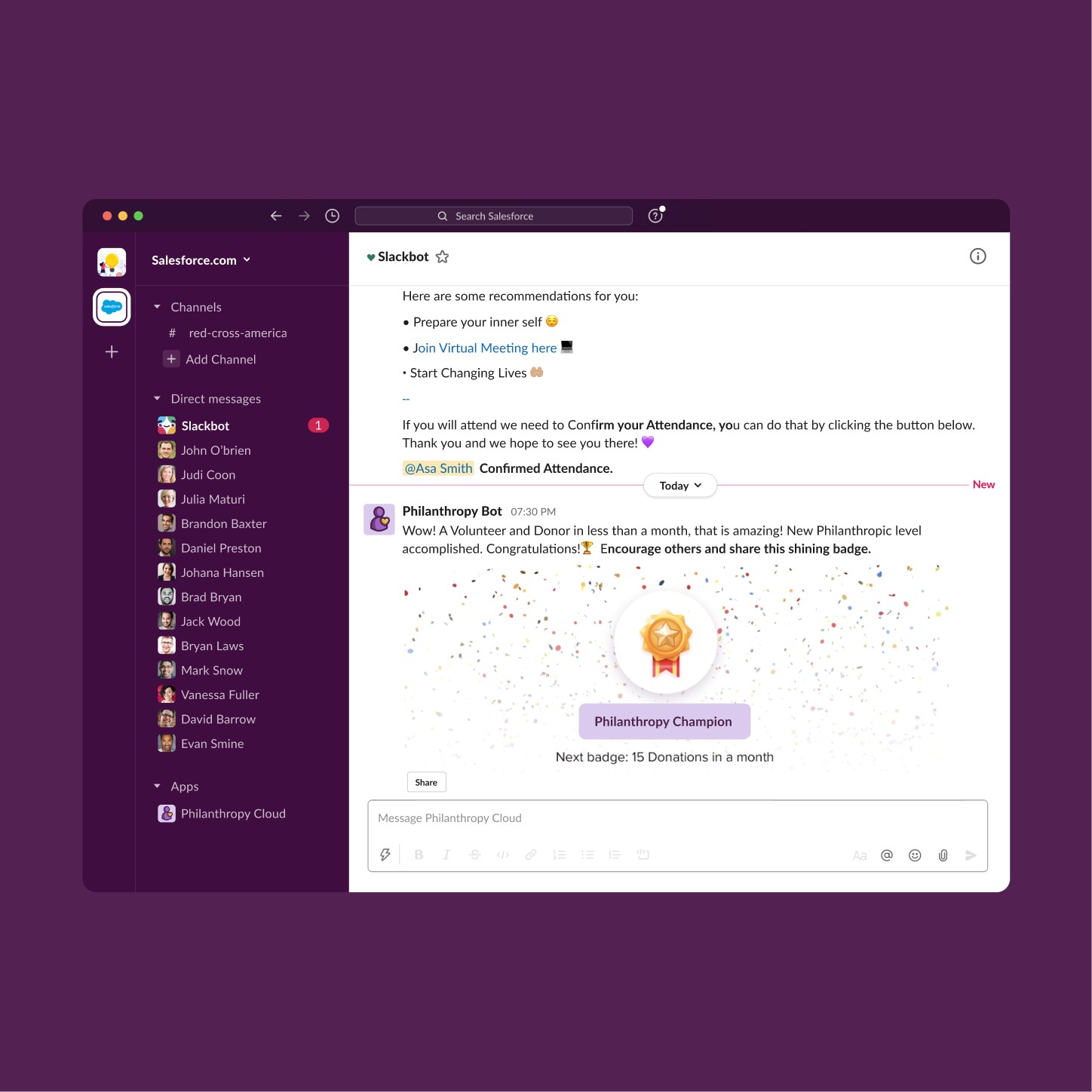
Intelligent Bot | Rewards & Badge Notification

The Philanthropy Bot operates as a proactive engagement layer delivered through Slack's native DM surface, triggering milestone notifications based on user activity thresholds. Badge awards are rendered as visually distinct message attachments—using celebratory imagery and clear achievement labeling—to activate an emotional response at the point of recognition.

App Home Tab | Impact Dashboard & Quick Actions

The Home Tab functions as the app's primary navigation surface within Slack, consolidating all entry points into a single persistent view. Admin quick actions—Create Volunteer Opportunity, Create Campaign, Request Matching Gift, Log Time—are exposed as a top-level button row, reducing the task path to a single tap. Below, individual and company impact metrics are displayed in a two-tier structure, reinforcing both personal accountability and collective progress. Recommended campaigns and volunteer opportunities are surfaced inline with direct Donate and Sign Up actions, collapsing the discovery-to-action funnel without requiring navigation outside the Home Tab.

Intelligent Bot | Rewards & Badge Notification

The Philanthropy Bot operates as a proactive engagement layer delivered through Slack's native DM surface, triggering milestone notifications based on user activity thresholds. Badge awards are rendered as visually distinct message attachments—using celebratory imagery and clear achievement labeling—to activate an emotional response at the point of recognition.

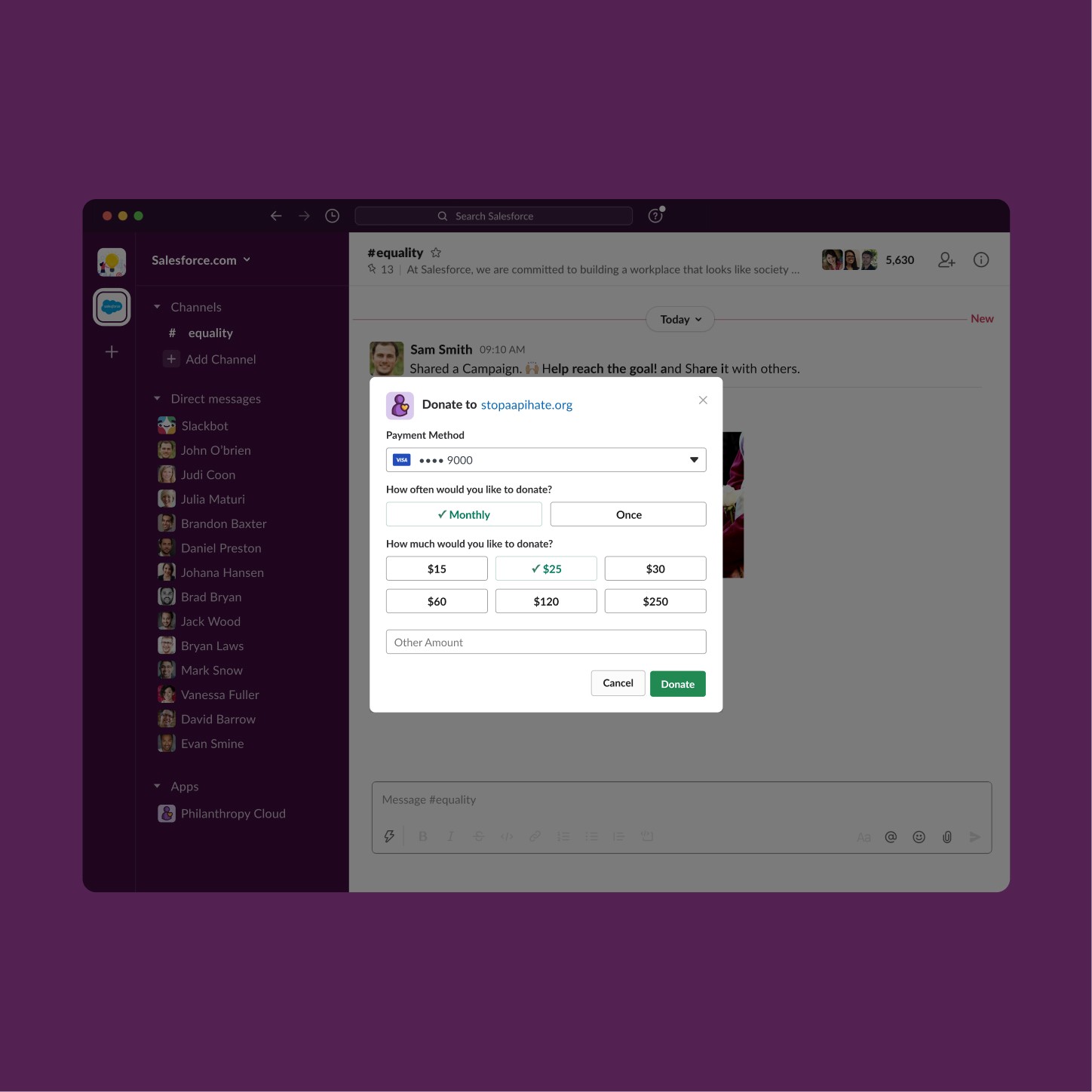
Donation Modal | Amount Selection & Payment Flow

The donation modal is triggered as a Slack-native overlay, isolating the transaction flow from the channel context without full-page navigation. Payment method is pre-populated. Frequency selection—Monthly vs. Once—is presented as a binary toggle preceding the amount grid, framing recurring giving as the default choice through visual priority. Suggested amounts are arranged in an ascending two-row grid with a pre-selected state, combining the ask ladder mechanic with an open-field fallback to accommodate the full range of giving intent.

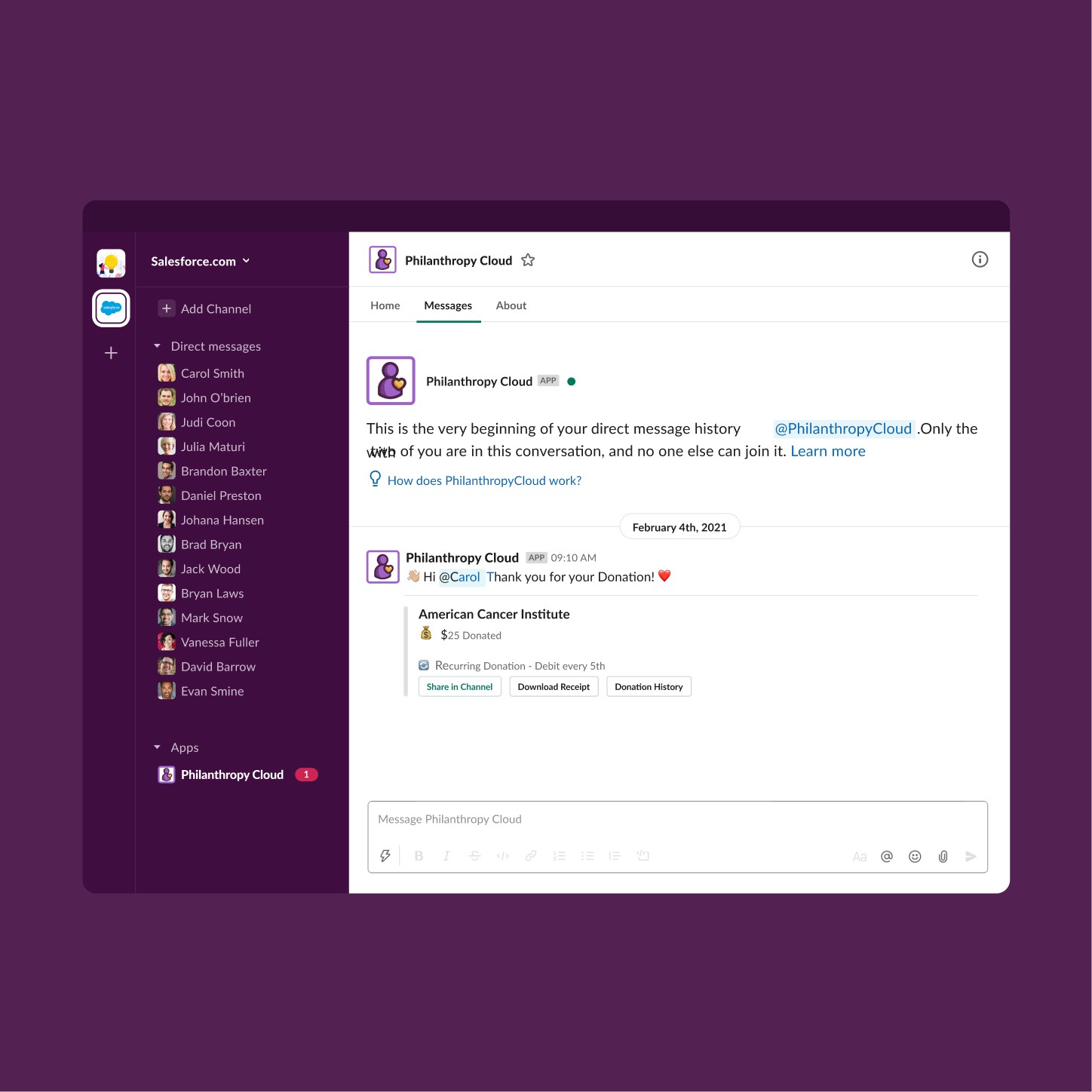
Philanthropy Bot | Post-Donation Confirmation & Smart Alerts

The bot delivers post-transaction confirmation through a private DM, scoping the interaction to the Messages tab to preserve channel cleanliness. Three contextual actions are exposed inline: Share in Channel extends social reach, Download Receipt supports tax documentation needs, and Donation History provides longitudinal giving context.

Donation Modal | Amount Selection & Payment Flow

The donation modal is triggered as a Slack-native overlay, isolating the transaction flow from the channel context without full-page navigation. Payment method is pre-populated. Frequency selection—Monthly vs. Once—is presented as a binary toggle preceding the amount grid, framing recurring giving as the default choice through visual priority. Suggested amounts are arranged in an ascending two-row grid with a pre-selected state, combining the ask ladder mechanic with an open-field fallback to accommodate the full range of giving intent.

Philanthropy Bot | Post-Donation Confirmation & Smart Alerts

The bot delivers post-transaction confirmation through a private DM, scoping the interaction to the Messages tab to preserve channel cleanliness. Three contextual actions are exposed inline: Share in Channel extends social reach, Download Receipt supports tax documentation needs, and Donation History provides longitudinal giving context.

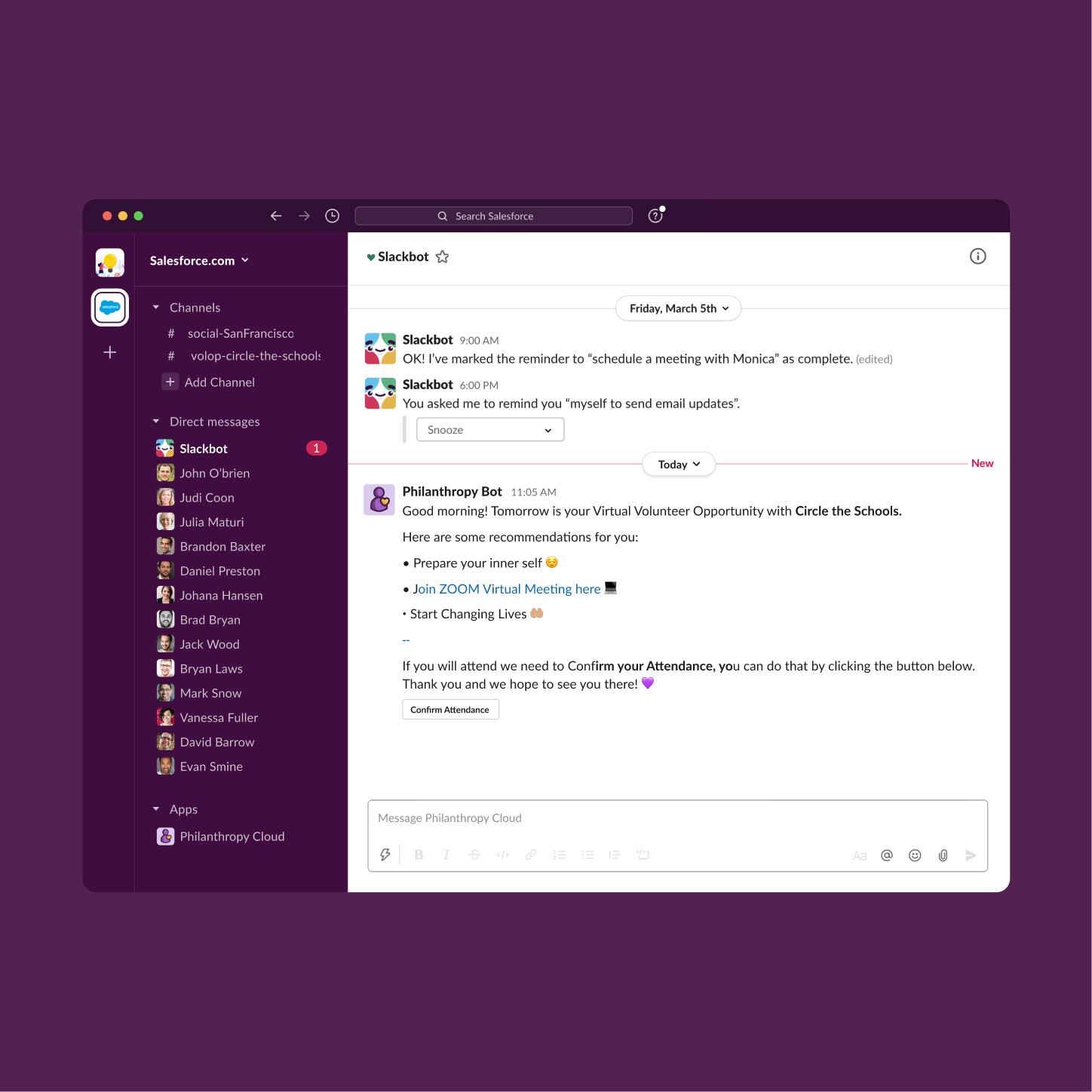
Philanthropy Bot | Pre-Event Smart Reminder

The bot delivers a time-sensitive reminder 24 hours before a scheduled virtual volunteer opportunity, colocating the alert within the existing Slackbot DM thread to avoid creating notification fatigue through a separate channel. Contextual preparation prompts are structured as a scannable action list, reducing pre-event cognitive load while setting clear participation expectations. The Confirm Attendance CTA is scoped to a single action, minimizing decision overhead at a moment when the user is already committed. Surfacing the virtual meeting link directly in the reminder eliminates the need to search for access credentials at event time.

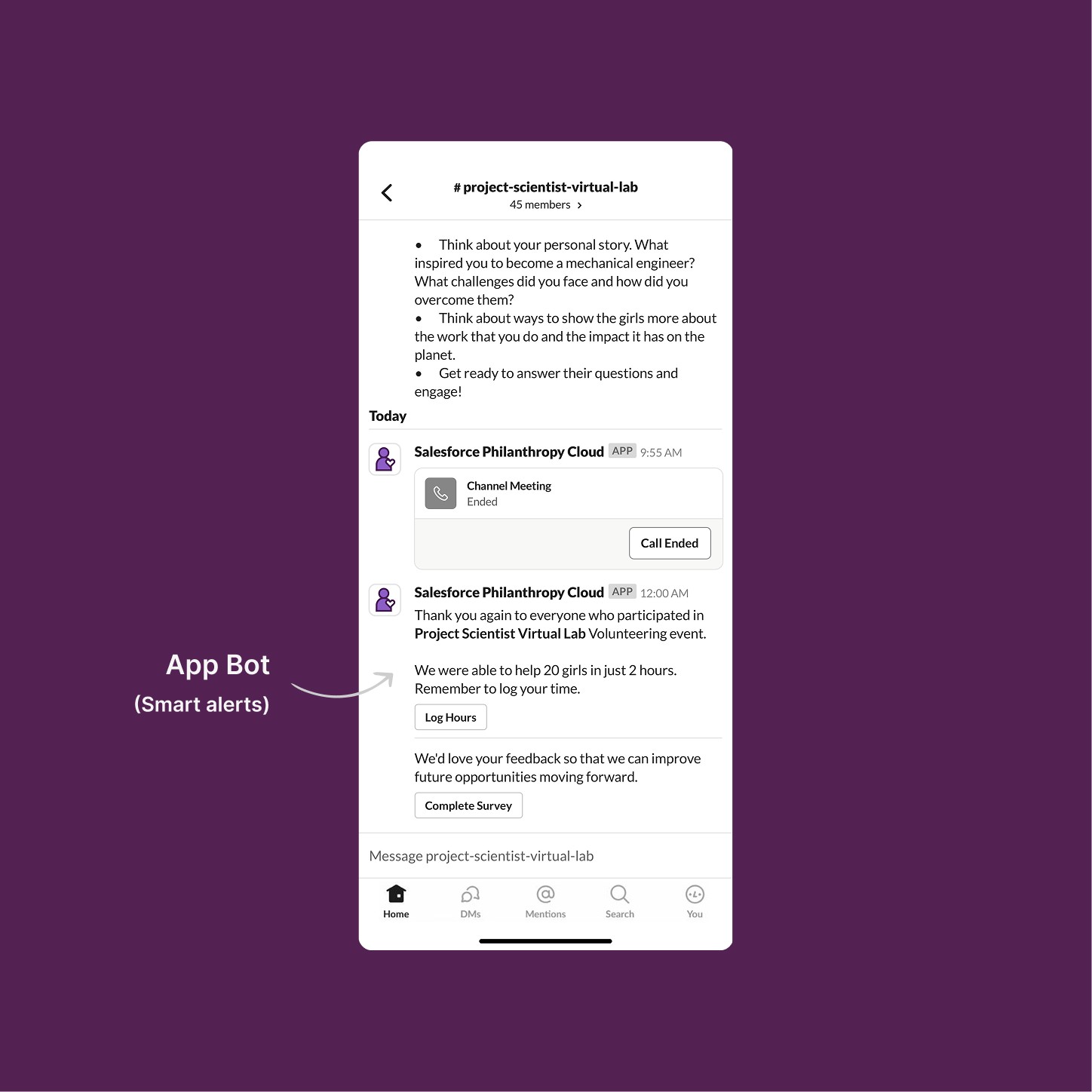
App Bot | Post-Event Automated Follow-up | Smart Alerts

The post-event message sequence is triggered automatically by the end of the Slack Channel Meeting, anchoring the follow-up to a system event rather than requiring manual outreach from organizers. Impact is quantified immediately—reinforcing the value of the volunteer's time at peak emotional salience.

Philanthropy Bot | Pre-Event Smart Reminder

The bot delivers a time-sensitive reminder 24 hours before a scheduled virtual volunteer opportunity, colocating the alert within the existing Slackbot DM thread to avoid creating notification fatigue through a separate channel. Contextual preparation prompts are structured as a scannable action list, reducing pre-event cognitive load while setting clear participation expectations. The Confirm Attendance CTA is scoped to a single action, minimizing decision overhead at a moment when the user is already committed. Surfacing the virtual meeting link directly in the reminder eliminates the need to search for access credentials at event time.

App Bot | Post-Event Automated Follow-up | Smart Alerts

The post-event message sequence is triggered automatically by the end of the Slack Channel Meeting, anchoring the follow-up to a system event rather than requiring manual outreach from organizers. Impact is quantified immediately—reinforcing the value of the volunteer's time at peak emotional salience.

The impact

Philanthropy Cloud Slack app was featured at Dreamforce 2021—Salesforce's flagship annual conference—as one of the key product integrations enabled by the Slack acquisition.
Dreamforce

Dreamforce

Debut showcase

Debut showcase

Debut showcase

Native

Native

Slack cross-platform experience

Slack cross-platform experience

Slack cross-platform experience

+100k

+100k

Enterprise users

Enterprise users

Enterprise users

From concept to Dreamforce

Philanthropy is most powerful when it's frictionless. By bringing Salesforce Philanthropy Cloud into Slack—the place where millions of employees already spend their workday—we removed the biggest barrier to giving: remembering to do it. The app didn't just replicate features; it met users where they were, in the flow of work, with the right action at the right moment. Designing under technical constraints, on an aggressive timeline, and for a dual audience of admins and end users made this one of the most challenging and formative projects of my career.